


 Operation and Maintenance
Linux Operation and Maintenance
How to improve network performance by modifying the bandwidth configuration of the instance when the existing network specifications of the instance do not meet the requirements
Operation and Maintenance
Linux Operation and Maintenance
How to improve network performance by modifying the bandwidth configuration of the instance when the existing network specifications of the instance do not meet the requirements
How to improve network performance by modifying the bandwidth configuration of the instance when the existing network specifications of the instance do not meet the requirements

This article introduces how to improve network performance by modifying the bandwidth configuration of the instance when the existing network specifications of the instance do not meet the requirements, and focuses on the specific steps. The content of this article is compact, and I hope you can gain something from it.
ModifyInstanceNetworkSpec
Description
When calling this interface, you need to pay attention to:
Modify the package year When configuring the bandwidth of a monthly (PrePaid) instance:
The billing method can be upgraded or downgraded to PayByTraffic bandwidth.
The billing method can only be upgraded to bandwidth based on fixed bandwidth (PayByBandwidth).
When the public network outgoing bandwidth (InternetMaxBandwidthOut) is upgraded from 0 Mbps to a non-zero value, a public network IP will be automatically assigned.
You can use this interface to convert the bandwidth billing method from PayByTraffic to PayByBandwidth.
You can only convert the bandwidth billing method from fixed bandwidth (PayByBandwidth) to payby traffic (PayByTraffic) through the ECS management console.
When modifying the bandwidth configuration of a Pay-As-You-Go (PostPaid) instance:
You can upgrade or downgrade the bandwidth.
When the public network outgoing bandwidth (InternetMaxBandwidthOut) is upgraded from 0 Mbps to a non-zero value, the public network IP will not be automatically assigned. You need to call AllocatePublicIpAddress to allocate a public network IP to the instance.
Supports the conversion of bandwidth billing method based on traffic usage (PayByTraffic) to fixed bandwidth (PayByBandwidth).
Supports converting the bandwidth billing method from fixed bandwidth (PayByBandwidth) to usage traffic (PayByTraffic).
For Classic network type instances, when the public network outgoing bandwidth (InternetMaxBandwidthOut) is upgraded from 0 Mbps to a non-zero value, the instance must be in the Stopped state.
After upgrading the bandwidth, fees will be automatically deducted by default. You need to ensure that your account balance is sufficient, otherwise an abnormal order will be generated, and the order can only be canceled at this time. If your account balance is insufficient, you can set the parameter AutoPay to false. At this time, a normal unpaid order will be generated, and you can log in to the ECS management console to pay.
Each prepaid (annual and monthly) instance can reduce the public network bandwidth no more than three times, that is, the price difference refund will not exceed three times.
The refund of the price difference before and after modifying the bandwidth configuration will be refunded to your original payment method, and the used vouchers will not be refunded.
Every time a single instance is successfully operated, the operation cannot be continued within five minutes.
Request parameters
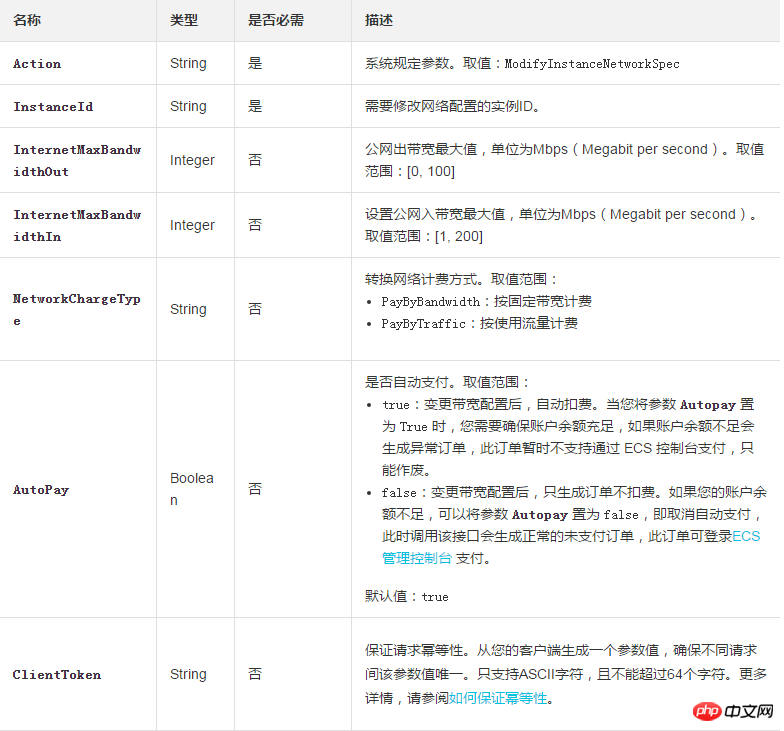
##Return parameters

Example
Request Example
https://ecs.aliyuncs.com/?Action=ModifyInstanceNetworkSpec
&RegionId=cn-hangzhou
&InstanceId=i-xxxxx1
&InternetMaxBandwidthOut=10
&ClientToken=xxxxxxxxxxxxxx
&<公共请求参数>
Return example
XML format
<ModifyInstanceNetworkSpecResponse>
      <RequestId>04F0F334-1335-436C-A1D7-6C044FE73368</RequestId>
</ModifyInstanceNetworkSpecResponse>JSON format
{
      "RequestId": "04F0F334-1335-436C-A1D7-6C044FE73368"
}Error code
The following are error codes unique to this interface. For more error codes, please visit the API Error Center.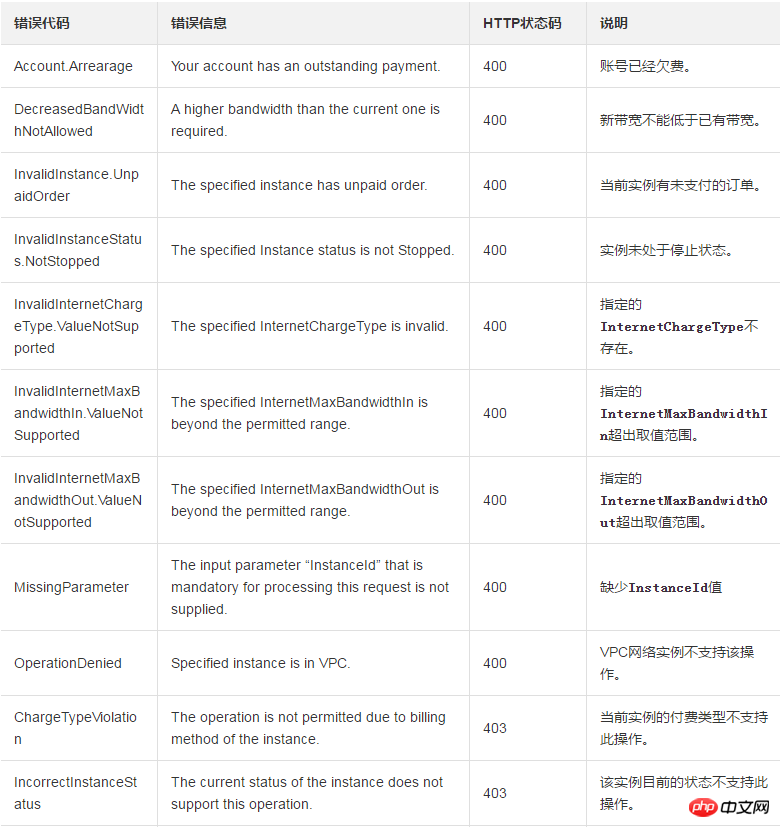
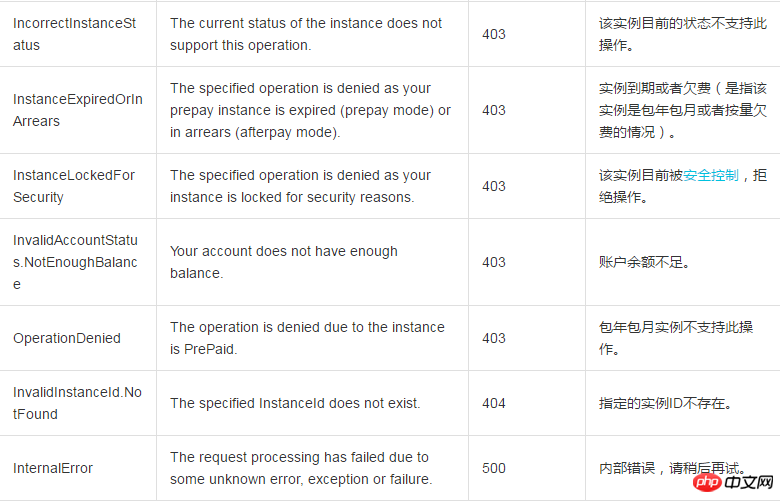
The above is the detailed content of How to improve network performance by modifying the bandwidth configuration of the instance when the existing network specifications of the instance do not meet the requirements. For more information, please follow other related articles on the PHP Chinese website!

Hot AI Tools

Undresser.AI Undress
AI-powered app for creating realistic nude photos

AI Clothes Remover
Online AI tool for removing clothes from photos.

Undress AI Tool
Undress images for free

Clothoff.io
AI clothes remover

AI Hentai Generator
Generate AI Hentai for free.

Hot Article
Hot Tools

Notepad++7.3.1
Easy-to-use and free code editor

SublimeText3 Chinese version
Chinese version, very easy to use

Zend Studio 13.0.1
Powerful PHP integrated development environment

Dreamweaver CS6
Visual web development tools

SublimeText3 Mac version
God-level code editing software (SublimeText3)
Hot Topics
 1378
1378
 52
52

 Difference between centos and ubuntu
Apr 14, 2025 pm 09:09 PM
Difference between centos and ubuntu
Apr 14, 2025 pm 09:09 PM
The key differences between CentOS and Ubuntu are: origin (CentOS originates from Red Hat, for enterprises; Ubuntu originates from Debian, for individuals), package management (CentOS uses yum, focusing on stability; Ubuntu uses apt, for high update frequency), support cycle (CentOS provides 10 years of support, Ubuntu provides 5 years of LTS support), community support (CentOS focuses on stability, Ubuntu provides a wide range of tutorials and documents), uses (CentOS is biased towards servers, Ubuntu is suitable for servers and desktops), other differences include installation simplicity (CentOS is thin)
 Centos stops maintenance 2024
Apr 14, 2025 pm 08:39 PM
Centos stops maintenance 2024
Apr 14, 2025 pm 08:39 PM
CentOS will be shut down in 2024 because its upstream distribution, RHEL 8, has been shut down. This shutdown will affect the CentOS 8 system, preventing it from continuing to receive updates. Users should plan for migration, and recommended options include CentOS Stream, AlmaLinux, and Rocky Linux to keep the system safe and stable.
 How to install centos
Apr 14, 2025 pm 09:03 PM
How to install centos
Apr 14, 2025 pm 09:03 PM
CentOS installation steps: Download the ISO image and burn bootable media; boot and select the installation source; select the language and keyboard layout; configure the network; partition the hard disk; set the system clock; create the root user; select the software package; start the installation; restart and boot from the hard disk after the installation is completed.
 Detailed explanation of docker principle
Apr 14, 2025 pm 11:57 PM
Detailed explanation of docker principle
Apr 14, 2025 pm 11:57 PM
Docker uses Linux kernel features to provide an efficient and isolated application running environment. Its working principle is as follows: 1. The mirror is used as a read-only template, which contains everything you need to run the application; 2. The Union File System (UnionFS) stacks multiple file systems, only storing the differences, saving space and speeding up; 3. The daemon manages the mirrors and containers, and the client uses them for interaction; 4. Namespaces and cgroups implement container isolation and resource limitations; 5. Multiple network modes support container interconnection. Only by understanding these core concepts can you better utilize Docker.
 What are the backup methods for GitLab on CentOS
Apr 14, 2025 pm 05:33 PM
What are the backup methods for GitLab on CentOS
Apr 14, 2025 pm 05:33 PM
Backup and Recovery Policy of GitLab under CentOS System In order to ensure data security and recoverability, GitLab on CentOS provides a variety of backup methods. This article will introduce several common backup methods, configuration parameters and recovery processes in detail to help you establish a complete GitLab backup and recovery strategy. 1. Manual backup Use the gitlab-rakegitlab:backup:create command to execute manual backup. This command backs up key information such as GitLab repository, database, users, user groups, keys, and permissions. The default backup file is stored in the /var/opt/gitlab/backups directory. You can modify /etc/gitlab
 How to use docker desktop
Apr 15, 2025 am 11:45 AM
How to use docker desktop
Apr 15, 2025 am 11:45 AM
How to use Docker Desktop? Docker Desktop is a tool for running Docker containers on local machines. The steps to use include: 1. Install Docker Desktop; 2. Start Docker Desktop; 3. Create Docker image (using Dockerfile); 4. Build Docker image (using docker build); 5. Run Docker container (using docker run).
 How to mount hard disk in centos
Apr 14, 2025 pm 08:15 PM
How to mount hard disk in centos
Apr 14, 2025 pm 08:15 PM
CentOS hard disk mount is divided into the following steps: determine the hard disk device name (/dev/sdX); create a mount point (it is recommended to use /mnt/newdisk); execute the mount command (mount /dev/sdX1 /mnt/newdisk); edit the /etc/fstab file to add a permanent mount configuration; use the umount command to uninstall the device to ensure that no process uses the device.
 What to do after centos stops maintenance
Apr 14, 2025 pm 08:48 PM
What to do after centos stops maintenance
Apr 14, 2025 pm 08:48 PM
After CentOS is stopped, users can take the following measures to deal with it: Select a compatible distribution: such as AlmaLinux, Rocky Linux, and CentOS Stream. Migrate to commercial distributions: such as Red Hat Enterprise Linux, Oracle Linux. Upgrade to CentOS 9 Stream: Rolling distribution, providing the latest technology. Select other Linux distributions: such as Ubuntu, Debian. Evaluate other options such as containers, virtual machines, or cloud platforms.
