


How to use date and time picker in WeChat applet development

This article mainly introduces in detail how to use the WeChat applet date and time selector. The customization is accurate to minutes, seconds or time periods. It has certain reference value. Interested friends can refer to it
The example in this article shares the WeChat applet date and time picker accurate to seconds for your reference. The specific content is as follows
Rendering
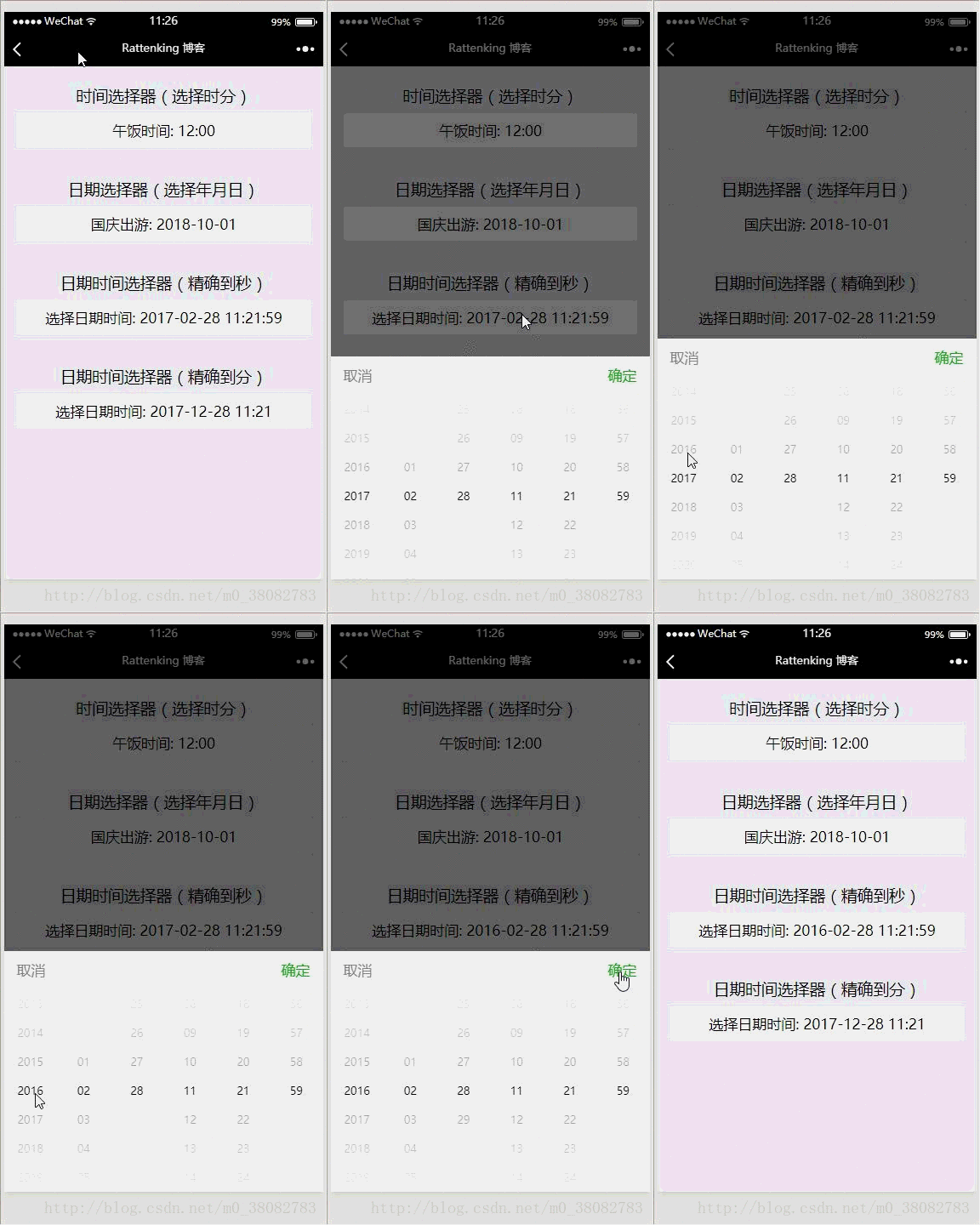
Implementation principle
Use the multi-column selector of the picker component of the WeChat applet to implement!
WXML
<view class="tui-picker-content">
 <view class="tui-picker-name">时间选择器(选择时分)</view>
 <picker mode="time" value="{{time}}" start="09:00" end="17:30" bindchange="changeTime">
 <view class="tui-picker-detail">
  午饭时间: {{time}}
 </view>
 </picker>
</view>

<view class="tui-picker-content">
 <view class="tui-picker-name">日期选择器(选择年月日)</view>
 <picker mode="date" value="{{date}}" start="2017-10-01" end="2017-10-08" bindchange="changeDate">
 <view class="tui-picker-detail">
  国庆出游: {{date}}
 </view>
 </picker>
</view>

<view class="tui-picker-content">
 <view class="tui-picker-name">日期时间选择器(精确到秒)</view>
 <picker mode="multiSelector" value="{{dateTime}}" bindchange="changeDateTime" bindcolumnchange="changeDateTimeColumn" range="{{dateTimeArray}}">
 <view class="tui-picker-detail">
  选择日期时间: {{dateTimeArray[0][dateTime[0]]}}-{{dateTimeArray[1][dateTime[1]]}}-{{dateTimeArray[2][dateTime[2]]}} {{dateTimeArray[3][dateTime[3]]}}:{{dateTimeArray[4][dateTime[4]]}}:{{dateTimeArray[5][dateTime[5]]}}
 </view>
 </picker>
</view>
<view class="tui-picker-content">
 <view class="tui-picker-name">日期时间选择器(精确到分)</view>
 <picker mode="multiSelector" value="{{dateTime1}}" bindchange="changeDateTime1" bindcolumnchange="changeDateTimeColumn1" range="{{dateTimeArray1}}">
 <view class="tui-picker-detail">
  选择日期时间: {{dateTimeArray1[0][dateTime1[0]]}}-{{dateTimeArray1[1][dateTime1[1]]}}-{{dateTimeArray1[2][dateTime1[2]]}} {{dateTimeArray1[3][dateTime1[3]]}}:{{dateTimeArray1[4][dateTime1[4]]}}
 </view>
 </picker>
</view>WXSS
@import "../picker/picker.wxss";
uses the three-level linkage selector style, so import it directly!
JS
var dateTimePicker = require('../../utils/dateTimePicker.js');

Page({
 data: {
 date: '2018-10-01',
 time: '12:00',
 dateTimeArray: null,
 dateTime: null,
 dateTimeArray1: null,
 dateTime1: null,
 startYear: 2000,
 endYear: 2050
 },
 onLoad(){
 // 获取完整的年月日 时分秒,以及默认显示的数组
 var obj = dateTimePicker.dateTimePicker(this.data.startYear, this.data.endYear);
 var obj1 = dateTimePicker.dateTimePicker(this.data.startYear, this.data.endYear);
 // 精确到分的处理,将数组的秒去掉
 var lastArray = obj1.dateTimeArray.pop();
 var lastTime = obj1.dateTime.pop();

 this.setData({
  dateTime: obj.dateTime,
  dateTimeArray: obj.dateTimeArray,
  dateTimeArray1: obj1.dateTimeArray,
  dateTime1: obj1.dateTime
 });
 },
 changeDate(e){
 this.setData({ date:e.detail.value});
 },
 changeTime(e){
 this.setData({ time: e.detail.value });
 },
 changeDateTime(e){
 this.setData({ dateTime: e.detail.value });
 },
 changeDateTime1(e) {
 this.setData({ dateTime1: e.detail.value });
 },
 changeDateTimeColumn(e){
 var arr = this.data.dateTime, dateArr = this.data.dateTimeArray;

 arr[e.detail.column] = e.detail.value;
 dateArr[2] = dateTimePicker.getMonthDay(dateArr[0][arr[0]], dateArr[1][arr[1]]);

 this.setData({
  dateTimeArray: dateArr,
  dateTime: arr
 });
 },
 changeDateTimeColumn1(e) {
 var arr = this.data.dateTime1, dateArr = this.data.dateTimeArray1;

 arr[e.detail.column] = e.detail.value;
 dateArr[2] = dateTimePicker.getMonthDay(dateArr[0][arr[0]], dateArr[1][arr[1]]);

 this.setData({
  dateTimeArray1: dateArr,
  dateTime1: arr
 });
 }
})External JS, introduction of dateTimePicker.js
function withData(param){
return param < 10 ? '0' + param : '' + param;
}
function getLoopArray(start,end){
var start = start || 0;
var end = end || 1;
var array = [];
for (var i = start; i <= end; i++) {
array.push(withData(i));
}
return array;
}
function getMonthDay(year,month){
var flag = year % 400 == 0 || (year % 4 == 0 && year % 100 != 0), array = null;
switch (month) {
case '01':
case '03':
case '05':
case '07':
case '08':
case '10':
case '12':
array = getLoopArray(1, 31)
break;
case '04':
case '06':
case '09':
case '11':
array = getLoopArray(1, 30)
break;
case '02':
array = flag ? getLoopArray(1, 29) : getLoopArray(1, 28)
break;
default:
array = '月份格式不正确,请重新输入!'
}
return array;
}
function getNewDateArry(){
// 当前时间的处理
var newDate = new Date();
var year = withData(newDate.getFullYear()),
mont = withData(newDate.getMonth() + 1),
date = withData(newDate.getDate()),
hour = withData(newDate.getHours()),
minu = withData(newDate.getMinutes()),
seco = withData(newDate.getSeconds());
return [year, mont, date, hour, minu, seco];
}
function dateTimePicker(startYear,endYear,date) {
// 返回默认显示的数组和联动数组的声明
var dateTime = [], dateTimeArray = [[],[],[],[],[],[]];
var start = startYear || 1978;
var end = endYear || 2100;
// 默认开始显示数据
var defaultDate = date ? [...date.split(' ')[0].split('-'), ...date.split(' ')[1].split(':')] : getNewDateArry();
// 处理联动列表数据
/*年月日 时分秒*/
dateTimeArray[0] = getLoopArray(start,end);
dateTimeArray[1] = getLoopArray(1, 12);
dateTimeArray[2] = getMonthDay(defaultDate[0], defaultDate[1]);
dateTimeArray[3] = getLoopArray(0, 23);
dateTimeArray[4] = getLoopArray(0, 59);
dateTimeArray[5] = getLoopArray(0, 59);
dateTimeArray.forEach((current,index) => {
dateTime.push(current.indexOf(defaultDate[index]));
});
return {
dateTimeArray: dateTimeArray,
dateTime: dateTime
}
}
module.exports = {
dateTimePicker: dateTimePicker,
getMonthDay: getMonthDay
}Summary
will be initialized The list and the array displayed by default during initialization are placed in dateTimePicker.js to prevent the page logic from being too confusing and can be used in multiple places;
# To determine whether it is a leap year, in the Miki expression, you must Don’t put 400 divisible in front because the OR operation will return true as long as one condition is met, and subsequent expressions will not be executed;
The merging method of switch case needs to pay attention to the format;
If only the linkage list needs to be updated and the second result display column is not updated, only the value of dateTimeArray is updated in the changeDateTimeColumn function.
The above is what I compiled for everyone. I hope it will be helpful to everyone in the future.
Related articles:
How to dynamically change static images and request network images in vue
How to implement dynamic binding in vue Set the image and data to return the image path
How to use Vue.set() to achieve dynamic response to data
The above is the detailed content of How to use date and time picker in WeChat applet development. For more information, please follow other related articles on the PHP Chinese website!

Hot AI Tools

Undresser.AI Undress
AI-powered app for creating realistic nude photos

AI Clothes Remover
Online AI tool for removing clothes from photos.

Undress AI Tool
Undress images for free

Clothoff.io
AI clothes remover

AI Hentai Generator
Generate AI Hentai for free.

Hot Article
Hot Tools

Notepad++7.3.1
Easy-to-use and free code editor

SublimeText3 Chinese version
Chinese version, very easy to use

Zend Studio 13.0.1
Powerful PHP integrated development environment

Dreamweaver CS6
Visual web development tools

SublimeText3 Mac version
God-level code editing software (SublimeText3)
Hot Topics
 1378
1378
 52
52

 How do I create and publish my own JavaScript libraries?
Mar 18, 2025 pm 03:12 PM
How do I create and publish my own JavaScript libraries?
Mar 18, 2025 pm 03:12 PM
Article discusses creating, publishing, and maintaining JavaScript libraries, focusing on planning, development, testing, documentation, and promotion strategies.
 How do I optimize JavaScript code for performance in the browser?
Mar 18, 2025 pm 03:14 PM
How do I optimize JavaScript code for performance in the browser?
Mar 18, 2025 pm 03:14 PM
The article discusses strategies for optimizing JavaScript performance in browsers, focusing on reducing execution time and minimizing impact on page load speed.
 What should I do if I encounter garbled code printing for front-end thermal paper receipts?
Apr 04, 2025 pm 02:42 PM
What should I do if I encounter garbled code printing for front-end thermal paper receipts?
Apr 04, 2025 pm 02:42 PM
Frequently Asked Questions and Solutions for Front-end Thermal Paper Ticket Printing In Front-end Development, Ticket Printing is a common requirement. However, many developers are implementing...
 How do I debug JavaScript code effectively using browser developer tools?
Mar 18, 2025 pm 03:16 PM
How do I debug JavaScript code effectively using browser developer tools?
Mar 18, 2025 pm 03:16 PM
The article discusses effective JavaScript debugging using browser developer tools, focusing on setting breakpoints, using the console, and analyzing performance.
 Who gets paid more Python or JavaScript?
Apr 04, 2025 am 12:09 AM
Who gets paid more Python or JavaScript?
Apr 04, 2025 am 12:09 AM
There is no absolute salary for Python and JavaScript developers, depending on skills and industry needs. 1. Python may be paid more in data science and machine learning. 2. JavaScript has great demand in front-end and full-stack development, and its salary is also considerable. 3. Influencing factors include experience, geographical location, company size and specific skills.
 How do I use source maps to debug minified JavaScript code?
Mar 18, 2025 pm 03:17 PM
How do I use source maps to debug minified JavaScript code?
Mar 18, 2025 pm 03:17 PM
The article explains how to use source maps to debug minified JavaScript by mapping it back to the original code. It discusses enabling source maps, setting breakpoints, and using tools like Chrome DevTools and Webpack.
 The difference in console.log output result: Why are the two calls different?
Apr 04, 2025 pm 05:12 PM
The difference in console.log output result: Why are the two calls different?
Apr 04, 2025 pm 05:12 PM
In-depth discussion of the root causes of the difference in console.log output. This article will analyze the differences in the output results of console.log function in a piece of code and explain the reasons behind it. �...
 TypeScript for Beginners, Part 2: Basic Data Types
Mar 19, 2025 am 09:10 AM
TypeScript for Beginners, Part 2: Basic Data Types
Mar 19, 2025 am 09:10 AM
Once you have mastered the entry-level TypeScript tutorial, you should be able to write your own code in an IDE that supports TypeScript and compile it into JavaScript. This tutorial will dive into various data types in TypeScript. JavaScript has seven data types: Null, Undefined, Boolean, Number, String, Symbol (introduced by ES6) and Object. TypeScript defines more types on this basis, and this tutorial will cover all of them in detail. Null data type Like JavaScript, null in TypeScript
