


 Web Front-end
JS Tutorial
Detailed explanation of the steps to install nodejs&npm to configure global path in Linux Centos7.2
Web Front-end
JS Tutorial
Detailed explanation of the steps to install nodejs&npm to configure global path in Linux Centos7.2
Detailed explanation of the steps to install nodejs&npm to configure global path in Linux Centos7.2

This time I will bring you a detailed explanation of the installationnodejs&npm configuration global path steps in Linux Centos7.2. What are the precautions for installing nodejs&npm configuration global path in Linux Centos7.2? The following is a practical case, let’s take a look.
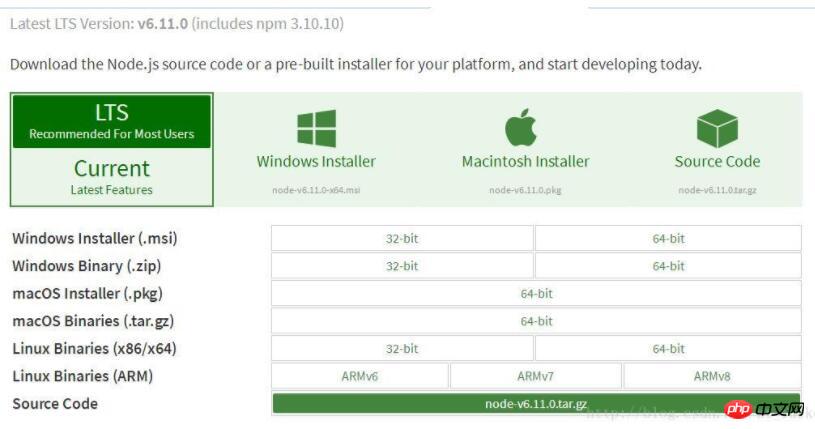
Check whether it is installed before installation
gcc
gcc-c++
python 2.7+
If not, yum install
After the download is completed Upload to Linux:
rz
If you don’t have rz sz, install it (yum -y install lrzsz)
Then follow the steps Execution:
cd /usr/local
mkdir nodejs6
cd nodejs6
rz ------ 选择nodejs文件
tar xzvf node-v6.11.0.tar.gz
cd node-v6.11.0
./configure
make (it takes a long time, about five to ten minutes, depending on the server configuration)
make install
Check whether the node is installed successfully

npm package installation is divided into two types: local installation (local) and global installation (global)
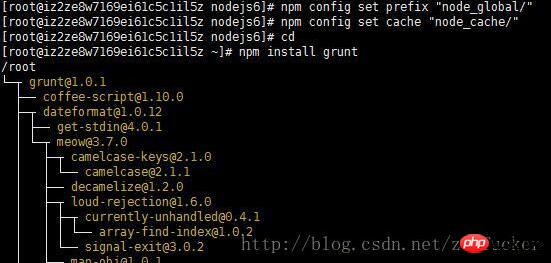
npm install grunt # 本地安装
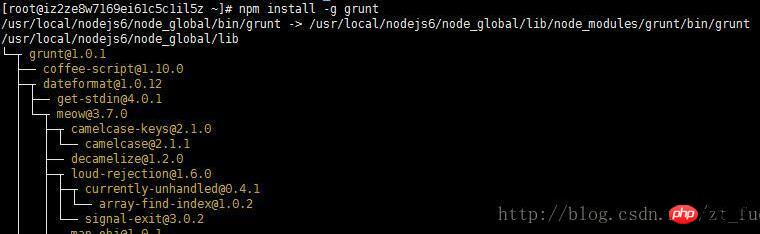
npm install -g grunt-cli # 全局安装
If you do not add -g, the default is to use local installation, npm will execute Download and install module components under the current path of the command.
If you add -g, you will use global installation, and npm will install it in the set global path. Convenient unified management.
Configure the global installation path and cachepath
cd /usr/local/nodejs6
mkdir node_global
mkdir node_cache
npm config set prefix "node_global"
npm config set cache "node_cache"
Test: local installation
Test: Global path installation
I believe you have mastered the method after reading the case in this article. For more exciting content, please pay attention to other related articles on the php Chinese website!
Recommended reading:
The above is the detailed content of Detailed explanation of the steps to install nodejs&npm to configure global path in Linux Centos7.2. For more information, please follow other related articles on the PHP Chinese website!

Hot AI Tools

Undresser.AI Undress
AI-powered app for creating realistic nude photos

AI Clothes Remover
Online AI tool for removing clothes from photos.

Undress AI Tool
Undress images for free

Clothoff.io
AI clothes remover

AI Hentai Generator
Generate AI Hentai for free.

Hot Article
Hot Tools

Notepad++7.3.1
Easy-to-use and free code editor

SublimeText3 Chinese version
Chinese version, very easy to use

Zend Studio 13.0.1
Powerful PHP integrated development environment

Dreamweaver CS6
Visual web development tools

SublimeText3 Mac version
God-level code editing software (SublimeText3)
Hot Topics
 1381
1381
 52
52

 Is nodejs a backend framework?
Apr 21, 2024 am 05:09 AM
Is nodejs a backend framework?
Apr 21, 2024 am 05:09 AM
Node.js can be used as a backend framework as it offers features such as high performance, scalability, cross-platform support, rich ecosystem, and ease of development.
 How to connect nodejs to mysql database
Apr 21, 2024 am 06:13 AM
How to connect nodejs to mysql database
Apr 21, 2024 am 06:13 AM
To connect to a MySQL database, you need to follow these steps: Install the mysql2 driver. Use mysql2.createConnection() to create a connection object that contains the host address, port, username, password, and database name. Use connection.query() to perform queries. Finally use connection.end() to end the connection.
 What is the difference between npm and npm.cmd files in the nodejs installation directory?
Apr 21, 2024 am 05:18 AM
What is the difference between npm and npm.cmd files in the nodejs installation directory?
Apr 21, 2024 am 05:18 AM
There are two npm-related files in the Node.js installation directory: npm and npm.cmd. The differences are as follows: different extensions: npm is an executable file, and npm.cmd is a command window shortcut. Windows users: npm.cmd can be used from the command prompt, npm can only be run from the command line. Compatibility: npm.cmd is specific to Windows systems, npm is available cross-platform. Usage recommendations: Windows users use npm.cmd, other operating systems use npm.
 What are the global variables in nodejs
Apr 21, 2024 am 04:54 AM
What are the global variables in nodejs
Apr 21, 2024 am 04:54 AM
The following global variables exist in Node.js: Global object: global Core module: process, console, require Runtime environment variables: __dirname, __filename, __line, __column Constants: undefined, null, NaN, Infinity, -Infinity
 Is there a big difference between nodejs and java?
Apr 21, 2024 am 06:12 AM
Is there a big difference between nodejs and java?
Apr 21, 2024 am 06:12 AM
The main differences between Node.js and Java are design and features: Event-driven vs. thread-driven: Node.js is event-driven and Java is thread-driven. Single-threaded vs. multi-threaded: Node.js uses a single-threaded event loop, and Java uses a multi-threaded architecture. Runtime environment: Node.js runs on the V8 JavaScript engine, while Java runs on the JVM. Syntax: Node.js uses JavaScript syntax, while Java uses Java syntax. Purpose: Node.js is suitable for I/O-intensive tasks, while Java is suitable for large enterprise applications.
 Is nodejs a back-end development language?
Apr 21, 2024 am 05:09 AM
Is nodejs a back-end development language?
Apr 21, 2024 am 05:09 AM
Yes, Node.js is a backend development language. It is used for back-end development, including handling server-side business logic, managing database connections, and providing APIs.
 How to deploy nodejs project to server
Apr 21, 2024 am 04:40 AM
How to deploy nodejs project to server
Apr 21, 2024 am 04:40 AM
Server deployment steps for a Node.js project: Prepare the deployment environment: obtain server access, install Node.js, set up a Git repository. Build the application: Use npm run build to generate deployable code and dependencies. Upload code to the server: via Git or File Transfer Protocol. Install dependencies: SSH into the server and use npm install to install application dependencies. Start the application: Use a command such as node index.js to start the application, or use a process manager such as pm2. Configure a reverse proxy (optional): Use a reverse proxy such as Nginx or Apache to route traffic to your application
 Which one to choose between nodejs and java?
Apr 21, 2024 am 04:40 AM
Which one to choose between nodejs and java?
Apr 21, 2024 am 04:40 AM
Node.js and Java each have their pros and cons in web development, and the choice depends on project requirements. Node.js excels in real-time applications, rapid development, and microservices architecture, while Java excels in enterprise-grade support, performance, and security.
