This article mainly introduces the detailed tutorial of React introducing container components and display components into Vue. The article introduces the reasons for using container components in great detail. Friends who need it can refer to it
If you If you have used Redux to develop React, you must have heard of container components (Smart/Container Components) or presentation components (Dumb/Presentational Components). What are the benefits of this division? Can we learn from this division to write Vue code? ? This article will demonstrate why we should adopt this pattern and how to write both components in Vue.
Why use container components?
If we want to write a component to display comments, before we have heard of container components, our The code is generally written like this:
It seems natural to write this way. Are there any problems or areas that can be optimized?
There is an obvious problem. Since CommentList.vue is coupled with the Vuex store of the project, it is difficult to reuse it without the current project.
Is there a better way to organize components that can solve this problem? It’s time to understand the concept of container components in the React community.
What is a container component
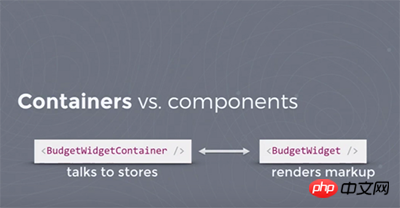
In React.js Conf 2015, there is a topic of Making your app fast with high-performance components introduced Container component.
The container component is specifically responsible for communicating with the store and passing data to the ordinary display component through props. If the display component wants to initiate an update of data, it also passes it through the container component through props. The callback function tells the store.
Since the display component is no longer directly coupled with the store, but defines the data and methods it needs through the props interface, the reusability of the display component will be higher.
The difference between container components and presentation components
Display component
Container component
#Function
Describe how to display (skeleton, Style)
Describe how to run (data acquisition, status update)
connector 实际上是一个能获取到 store 实例的连接器,可以在初始化 vuex store 的时候进行初始化。
import Vue from 'vue';
import Vuex from 'vuex';
import VuexConnector from '@xunlei/vuex-connector';
Vue.use(Vuex);
const store = new Vuex.Store({
// your store
});
export const connector = new VuexConnector(store);
export default store;
VuexConnector 不依赖 this.$store,而是依赖初始化传入的 store 实例,容器组件可以用 connect 将展示组件与 store 进行连接。
由于不依赖 this.$store,我们在程序入口 new Vue 的时候,就不需要传入 store 实例了。
比如,之前我们是通过下面的方式进行初始化:
import Vue from 'vue';
import App from './App';
import store from './store';
new Vue({
el: '#app',
components: {App},
template: '<App/>',
store,
});
Copy after login
使用了 VuexConnector 之后,在最初 new Vue 的时候就不需要也最好不要传递 store 了,这样就避免了 this.$store 泛滥导致代码耦合的问题。
引入容器组件/展示组件模式带来的好处
可复用性
容器组件/展示组件的划分,采用了单一职责原则的设计模式,容器组件专门负责和 store 通信,展示组件只负责展示,解除了组件的耦合,可以带来更好的可复用性。
The above is the detailed content of Detailed tutorial on React introducing container components and display components to Vue. For more information, please follow other related articles on the PHP Chinese website!
Statement of this Website
The content of this article is voluntarily contributed by netizens, and the copyright belongs to the original author. This site does not assume corresponding legal responsibility. If you find any content suspected of plagiarism or infringement, please contact admin@php.cn
React front-end and back-end separation guide: How to achieve front-end and back-end decoupling and independent deployment, specific code examples are required In today's web development environment, front-end and back-end separation has become a trend. By separating front-end and back-end code, development work can be made more flexible, efficient, and facilitate team collaboration. This article will introduce how to use React to achieve front-end and back-end separation, thereby achieving the goals of decoupling and independent deployment. First, we need to understand what front-end and back-end separation is. In the traditional web development model, the front-end and back-end are coupled
How to use React and Flask to build simple and easy-to-use web applications Introduction: With the development of the Internet, the needs of web applications are becoming more and more diverse and complex. In order to meet user requirements for ease of use and performance, it is becoming increasingly important to use modern technology stacks to build network applications. React and Flask are two very popular frameworks for front-end and back-end development, and they work well together to build simple and easy-to-use web applications. This article will detail how to leverage React and Flask
Many users always encounter some problems when playing some games on win10, such as screen freezes and blurred screens. At this time, we can solve the problem by turning on the directplay function, and the operation method of the function is also Very simple. How to install directplay, the old component of win10 1. Enter "Control Panel" in the search box and open it 2. Select large icons as the viewing method 3. Find "Programs and Features" 4. Click on the left to enable or turn off win functions 5. Select the old version here Just check the box
How to build a reliable messaging application with React and RabbitMQ Introduction: Modern applications need to support reliable messaging to achieve features such as real-time updates and data synchronization. React is a popular JavaScript library for building user interfaces, while RabbitMQ is a reliable messaging middleware. This article will introduce how to combine React and RabbitMQ to build a reliable messaging application, and provide specific code examples. RabbitMQ overview:
ReactRouter User Guide: How to Implement Front-End Routing Control With the popularity of single-page applications, front-end routing has become an important part that cannot be ignored. As the most popular routing library in the React ecosystem, ReactRouter provides rich functions and easy-to-use APIs, making the implementation of front-end routing very simple and flexible. This article will introduce how to use ReactRouter and provide some specific code examples. To install ReactRouter first, we need
How to use React and Apache Kafka to build real-time data processing applications Introduction: With the rise of big data and real-time data processing, building real-time data processing applications has become the pursuit of many developers. The combination of React, a popular front-end framework, and Apache Kafka, a high-performance distributed messaging system, can help us build real-time data processing applications. This article will introduce how to use React and Apache Kafka to build real-time data processing applications, and
The default display behavior for components in the Angular framework is not for block-level elements. This design choice promotes encapsulation of component styles and encourages developers to consciously define how each component is displayed. By explicitly setting the CSS property display, the display of Angular components can be fully controlled to achieve the desired layout and responsiveness.
PHP, Vue and React: How to choose the most suitable front-end framework? With the continuous development of Internet technology, front-end frameworks play a vital role in Web development. PHP, Vue and React are three representative front-end frameworks, each with its own unique characteristics and advantages. When choosing which front-end framework to use, developers need to make an informed decision based on project needs, team skills, and personal preferences. This article will compare the characteristics and uses of the three front-end frameworks PHP, Vue and React.


 Web Front-end