


Reasons why installation of mysql service failed to start

This time I will bring you InstallationThe reasons why the mysql service fails to start, and what are the precautions to solve the problem of failure to start the mysql service. The following is a practical case, let’s take a look. .
MySQL is a very powerful relational database. However, some beginners encounter various difficulties when installing and configuring. I will not talk about the installation process here, but the configuration process. When downloading mysql from the official website, there are msi format and zip format. You can directly run the Msi to install it, and unzip the zip to your favorite directory address. When installing both of these, they need to be configured before they can be used. The following introduction is mainly the default address of msi format: C:\Program Files\ mysql-5.7.18-win32.
one. After installation or decompression, you need to configure environment variables. The process is as follows: My Computer->Properties->Advanced System Settings->Advanced->Environment Variables. Click path in System Variables and select Edit. Add "C:\ProgramFiles\mysql-5.7.18-win32\bin;". What needs to be noted here is that it is not coverage! Also, it is best to add it at the front. The British semicolon ";" cannot be omitted. (You can also insert it in the middle, but remember to append it after ";".)

2. Click the Start menu, Searchcmd.exe, left-click to run as administrator. Be sure to run as administrator! ! !

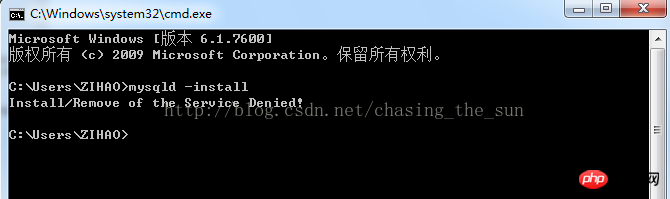
If you run cmd directly, an error due to insufficient permissions will appear when entering mysqld -install: Install/Remove of theService Denied!
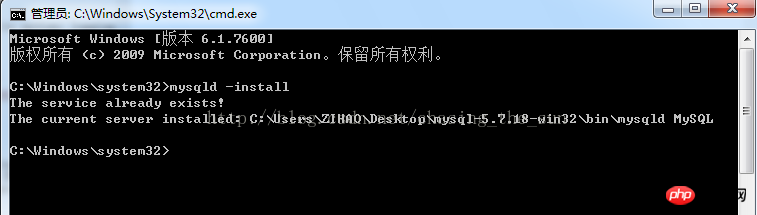
Correctly enter mysqld –install and press the Enter key. The service already exists!
3. Then enter net start mysql to start the server. If it shows that the server failed to start, as shown below.
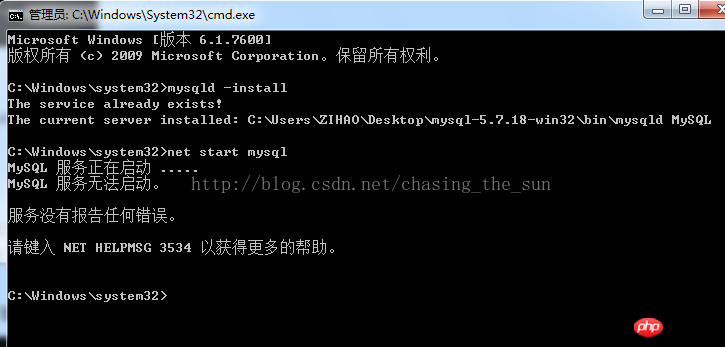
This is because in versions 5.7 and above, there is no data folder in the C:\Program Files\mysql-5.7+ directory. Here, remember not to copy other versions of mysql. data folder, instead enter mysqld--initialize-insecure --user=mysql in the window. It should be noted that there is a space in front of "--", and then press Enter. (It takes half a minute to wait, depending on the speed of the computer)

(In the C:\ProgramFiles\mysql-5.7.18-win32 directory, it is shown that there is no data folder. As follows Picture)

Note: In versions below 5.7, you need to modify my-default.ini in the C:\ProgramFiles\mysql-5.* directory, right-click Just edit, change
basedir=……
datadir=…..
to
basedir= C:\Program Files\mysql-5.*
datadir= C:\Program Files\mysql-5.*\data
That's it, "C:\Program Files\mysql-5.*" is determined based on the actual installation location
IV. In the C:\ProgramFiles\mysql-5.7.18-win32 directory, it shows that the data folder was created successfully.

After creating the data, enter mysqld –install and press Enter (if the startup is successful in step three, there is no need to enter it again)

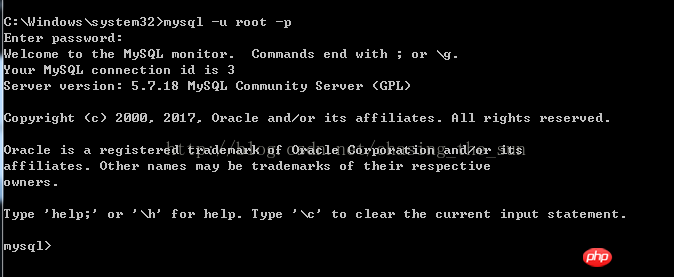
5. After the service is started successfully, you can log in. Enter mysql -u root –p and press the Enter key. Enter password will appear. Because there is no login password set, you don’t need to enter anything. Just press the Enter key.

After pressing Enter, as shown below, the mysql configuration has been successful!
# I believe you have mastered the method after reading the case in this article. For more exciting information, please pay attention to other related articles on the php Chinese website!
Recommended reading:
Vue production of image carousels
How to operate tables in Bootstrap
JS gets the value in the first element in the select drop-down box
Use AngularJS to get the password in the front-end interface
The above is the detailed content of Reasons why installation of mysql service failed to start. For more information, please follow other related articles on the PHP Chinese website!

Hot AI Tools

Undresser.AI Undress
AI-powered app for creating realistic nude photos

AI Clothes Remover
Online AI tool for removing clothes from photos.

Undress AI Tool
Undress images for free

Clothoff.io
AI clothes remover

AI Hentai Generator
Generate AI Hentai for free.

Hot Article
Hot Tools

Notepad++7.3.1
Easy-to-use and free code editor

SublimeText3 Chinese version
Chinese version, very easy to use

Zend Studio 13.0.1
Powerful PHP integrated development environment

Dreamweaver CS6
Visual web development tools

SublimeText3 Mac version
God-level code editing software (SublimeText3)
Hot Topics
 1384
1384
 52
52

 MySQL: Simple Concepts for Easy Learning
Apr 10, 2025 am 09:29 AM
MySQL: Simple Concepts for Easy Learning
Apr 10, 2025 am 09:29 AM
MySQL is an open source relational database management system. 1) Create database and tables: Use the CREATEDATABASE and CREATETABLE commands. 2) Basic operations: INSERT, UPDATE, DELETE and SELECT. 3) Advanced operations: JOIN, subquery and transaction processing. 4) Debugging skills: Check syntax, data type and permissions. 5) Optimization suggestions: Use indexes, avoid SELECT* and use transactions.
 How to open phpmyadmin
Apr 10, 2025 pm 10:51 PM
How to open phpmyadmin
Apr 10, 2025 pm 10:51 PM
You can open phpMyAdmin through the following steps: 1. Log in to the website control panel; 2. Find and click the phpMyAdmin icon; 3. Enter MySQL credentials; 4. Click "Login".
 MySQL: An Introduction to the World's Most Popular Database
Apr 12, 2025 am 12:18 AM
MySQL: An Introduction to the World's Most Popular Database
Apr 12, 2025 am 12:18 AM
MySQL is an open source relational database management system, mainly used to store and retrieve data quickly and reliably. Its working principle includes client requests, query resolution, execution of queries and return results. Examples of usage include creating tables, inserting and querying data, and advanced features such as JOIN operations. Common errors involve SQL syntax, data types, and permissions, and optimization suggestions include the use of indexes, optimized queries, and partitioning of tables.
 Why Use MySQL? Benefits and Advantages
Apr 12, 2025 am 12:17 AM
Why Use MySQL? Benefits and Advantages
Apr 12, 2025 am 12:17 AM
MySQL is chosen for its performance, reliability, ease of use, and community support. 1.MySQL provides efficient data storage and retrieval functions, supporting multiple data types and advanced query operations. 2. Adopt client-server architecture and multiple storage engines to support transaction and query optimization. 3. Easy to use, supports a variety of operating systems and programming languages. 4. Have strong community support and provide rich resources and solutions.
 How to use single threaded redis
Apr 10, 2025 pm 07:12 PM
How to use single threaded redis
Apr 10, 2025 pm 07:12 PM
Redis uses a single threaded architecture to provide high performance, simplicity, and consistency. It utilizes I/O multiplexing, event loops, non-blocking I/O, and shared memory to improve concurrency, but with limitations of concurrency limitations, single point of failure, and unsuitable for write-intensive workloads.
 MySQL and SQL: Essential Skills for Developers
Apr 10, 2025 am 09:30 AM
MySQL and SQL: Essential Skills for Developers
Apr 10, 2025 am 09:30 AM
MySQL and SQL are essential skills for developers. 1.MySQL is an open source relational database management system, and SQL is the standard language used to manage and operate databases. 2.MySQL supports multiple storage engines through efficient data storage and retrieval functions, and SQL completes complex data operations through simple statements. 3. Examples of usage include basic queries and advanced queries, such as filtering and sorting by condition. 4. Common errors include syntax errors and performance issues, which can be optimized by checking SQL statements and using EXPLAIN commands. 5. Performance optimization techniques include using indexes, avoiding full table scanning, optimizing JOIN operations and improving code readability.
 MySQL's Place: Databases and Programming
Apr 13, 2025 am 12:18 AM
MySQL's Place: Databases and Programming
Apr 13, 2025 am 12:18 AM
MySQL's position in databases and programming is very important. It is an open source relational database management system that is widely used in various application scenarios. 1) MySQL provides efficient data storage, organization and retrieval functions, supporting Web, mobile and enterprise-level systems. 2) It uses a client-server architecture, supports multiple storage engines and index optimization. 3) Basic usages include creating tables and inserting data, and advanced usages involve multi-table JOINs and complex queries. 4) Frequently asked questions such as SQL syntax errors and performance issues can be debugged through the EXPLAIN command and slow query log. 5) Performance optimization methods include rational use of indexes, optimized query and use of caches. Best practices include using transactions and PreparedStatemen
 How to build a SQL database
Apr 09, 2025 pm 04:24 PM
How to build a SQL database
Apr 09, 2025 pm 04:24 PM
Building an SQL database involves 10 steps: selecting DBMS; installing DBMS; creating a database; creating a table; inserting data; retrieving data; updating data; deleting data; managing users; backing up the database.
