


 Backend Development
PHP Tutorial
Examples of ajax dynamic assignment of echarts (pie charts and column charts)
Backend Development
PHP Tutorial
Examples of ajax dynamic assignment of echarts (pie charts and column charts)
Examples of ajax dynamic assignment of echarts (pie charts and column charts)

Ajax refers to a web development technology for creating interactive web applications. The editor below will share with you an example of ajax dynamic assignment of echarts (pie chart and column chart), which has a good reference value and I hope it will be helpful to everyone. Let’s follow the editor and take a look.
This article takes column chart and pie chart ajax dynamic assignment as an example
1. Pie chart assignment steps
(1) jsp page
<!-- 引入echarts官方js -->
<script src="js/echarts.js"></script>
<body>
<!-- 为 ECharts 准备一个具备大小(宽高)的 DOM 饼形图 -->
<p id="first" style="width: 600px;height:400px;"></p>
[html] view plain copy
</body>
(2) js page
//饼图模板
var dom = document.getElementById("first");
var myChart = echarts.init(dom);
var app = {};
option = null;
option = {
title : {
text: '用户位置记录',
subtext: '',
x:'center'
},
tooltip : {
trigger: 'item',
formatter: "{a} <br/>{b} : {c} ({d}%)"
},
legend: {
orient : 'vertical',
x : 'left',
data:[]
},
toolbox: {
show : true,
feature : {
mark : {show: true},
dataView : {show: true, readOnly: false},
magicType : {
show: true,
type: ['pie', 'funnel'],
option: {
funnel: {
x: '25%',
width: '50%',
funnelAlign: 'left',
max: 1548
}
}
},
restore : {show: true},
saveAsImage : {show: true}
}
},
calculable : true,
series : [
{
name:'',
type:'pie',
radius : '55%',
center: ['50%', '60%'],
data:[]
}
]
};
;
if (option && typeof option === "object") {
myChart.setOption(option, true);
}
//饼图动态赋值
var year = $("#year-search").val();
var mouth = $("#mouth-search").val();
$.ajax({
type: "get",
url: rootPath+"/wxbound/getPieDataByMouth.action",
data : {"year":year,"mouth":mouth},
cache : false, //禁用缓存
dataType: "json",
success: function(result) {
var names=[];//定义两个数组
var nums=[];
$.each(result,function(key,values){ //此处我返回的是list<String,map<String,String>>循环map
names.push(values.province_name);
var obj = new Object();
obj.name = values.province_name;
obj.value = values.count;
nums.push(obj);
});
myChart.setOption({ //加载数据图表
legend: {
data: names
},
series: {
// 根据名字对应到相应的系列
name: ['数量'],
data: nums
}
});
},
error: function(XMLHttpRequest, textStatus, errorThrown) {
alert("查询失败");
}
});(3) Backend code according to your own code Just like
(4) Display style

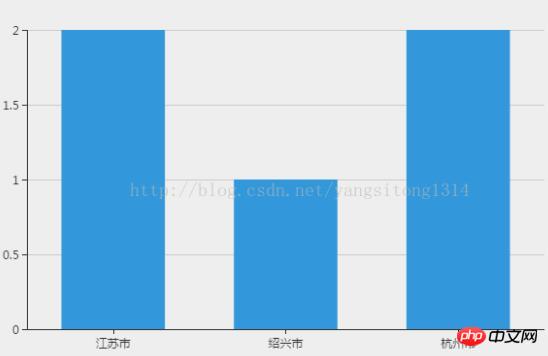
## 2. Column chart assignment steps
(1) jsp page
<!-- 引入echarts官方js -->
<script src="js/echarts.js"></script>
<body>
<!-- 为 ECharts 准备一个具备大小(宽高)的 DOM 柱形图 -->
<p id="second" style="width: 600px;height:400px;"></p>
</body>
(2) js page
//柱形图模板
var domLong = document.getElementById("second");
var myChartSecond = echarts.init(domLong);
var app = {};
option = null;
option = {
   color: ['#3398DB'],
   tooltip : {
     trigger: 'axis',
     axisPointer : {      // 坐标轴指示器,坐标轴触发有效
       type : 'shadow'    // 默认为直线,可选为:'line' | 'shadow'
     }
   },
   grid: {
     left: '3%',
     right: '4%',
     bottom: '3%',
     containLabel: true
   },
   xAxis : [
     {
       type : 'category',
       data : [],
       axisTick: {
         alignWithLabel: true
       }
     }
   ],
   yAxis : [
     {
       type : 'value'
     }
   ],
   series : [
     {
       name:'直接访问',
       type:'bar',
       barWidth: '60%',
       data:[]
     }
   ]
 };
if (option && typeof option === "object") {
 myChartSecond.setOption(option, true);
}
//给柱形图赋值
 var year = $("#year-search").val();
 $.ajax({
      type: "post",
      url: rootPath+"/wxbound/getWxboundList.action",
      data : {"year":year},
      cache : false, //禁用缓存
      dataType: "json",
      success: function(result) {
     console.log(result);
     var linNames=[];
   var linNums=[];
     $.each(result.lin,function(key,values){
     linNames.push(values.mouth);
     linNums.push(values.count);
    });
   //柱形图赋值
   myChartSecond.setOption({ //加载数据图表
    xAxis: {
               data: linNames
                },
            series: {
             // 根据名字对应到相应的系列
             name: ['数量'],
             data: linNums
         }
    });
      },
      error: function(XMLHttpRequest, textStatus, errorThrown) {
        alert("查询失败");
      }
    });
}(3) Just adjust the background code part according to your own needs. . .
(4) Picture style
AjaxUpLoad.js example code for file upload
AJAX POST data in Chinese How to solve garbled characters
Method examples for judging ajax requests
The above is the detailed content of Examples of ajax dynamic assignment of echarts (pie charts and column charts). For more information, please follow other related articles on the PHP Chinese website!

Hot AI Tools

Undresser.AI Undress
AI-powered app for creating realistic nude photos

AI Clothes Remover
Online AI tool for removing clothes from photos.

Undress AI Tool
Undress images for free

Clothoff.io
AI clothes remover

AI Hentai Generator
Generate AI Hentai for free.

Hot Article
Hot Tools

Notepad++7.3.1
Easy-to-use and free code editor

SublimeText3 Chinese version
Chinese version, very easy to use

Zend Studio 13.0.1
Powerful PHP integrated development environment

Dreamweaver CS6
Visual web development tools

SublimeText3 Mac version
God-level code editing software (SublimeText3)
Hot Topics
 1381
1381
 52
52

 How to solve the 403 error encountered by jQuery AJAX request
Feb 20, 2024 am 10:07 AM
How to solve the 403 error encountered by jQuery AJAX request
Feb 20, 2024 am 10:07 AM
Title: Methods and code examples to resolve 403 errors in jQuery AJAX requests. The 403 error refers to a request that the server prohibits access to a resource. This error usually occurs because the request lacks permissions or is rejected by the server. When making jQueryAJAX requests, you sometimes encounter this situation. This article will introduce how to solve this problem and provide code examples. Solution: Check permissions: First ensure that the requested URL address is correct and verify that you have sufficient permissions to access the resource.
 How to solve jQuery AJAX request 403 error
Feb 19, 2024 pm 05:55 PM
How to solve jQuery AJAX request 403 error
Feb 19, 2024 pm 05:55 PM
jQuery is a popular JavaScript library used to simplify client-side development. AJAX is a technology that sends asynchronous requests and interacts with the server without reloading the entire web page. However, when using jQuery to make AJAX requests, you sometimes encounter 403 errors. 403 errors are usually server-denied access errors, possibly due to security policy or permission issues. In this article, we will discuss how to resolve jQueryAJAX request encountering 403 error
 How to solve the problem of jQuery AJAX error 403?
Feb 23, 2024 pm 04:27 PM
How to solve the problem of jQuery AJAX error 403?
Feb 23, 2024 pm 04:27 PM
How to solve the problem of jQueryAJAX error 403? When developing web applications, jQuery is often used to send asynchronous requests. However, sometimes you may encounter error code 403 when using jQueryAJAX, indicating that access is forbidden by the server. This is usually caused by server-side security settings, but there are ways to work around it. This article will introduce how to solve the problem of jQueryAJAX error 403 and provide specific code examples. 1. to make
 PHP and Ajax: Building an autocomplete suggestion engine
Jun 02, 2024 pm 08:39 PM
PHP and Ajax: Building an autocomplete suggestion engine
Jun 02, 2024 pm 08:39 PM
Build an autocomplete suggestion engine using PHP and Ajax: Server-side script: handles Ajax requests and returns suggestions (autocomplete.php). Client script: Send Ajax request and display suggestions (autocomplete.js). Practical case: Include script in HTML page and specify search-input element identifier.
 How to get variables from PHP method using Ajax?
Mar 09, 2024 pm 05:36 PM
How to get variables from PHP method using Ajax?
Mar 09, 2024 pm 05:36 PM
Using Ajax to obtain variables from PHP methods is a common scenario in web development. Through Ajax, the page can be dynamically obtained without refreshing the data. In this article, we will introduce how to use Ajax to get variables from PHP methods, and provide specific code examples. First, we need to write a PHP file to handle the Ajax request and return the required variables. Here is sample code for a simple PHP file getData.php:
 Does ECharts depend on jQuery? In-depth analysis
Feb 27, 2024 am 08:39 AM
Does ECharts depend on jQuery? In-depth analysis
Feb 27, 2024 am 08:39 AM
Does ECharts need to rely on jQuery? Detailed interpretation requires specific code examples. ECharts is an excellent data visualization library that provides a rich range of chart types and interactive functions and is widely used in web development. When using ECharts, many people will have a question: Does ECharts need to rely on jQuery? This article will explain this in detail and give specific code examples. First, to be clear, ECharts itself does not rely on jQuery;
 PHP vs. Ajax: Solutions for creating dynamically loaded content
Jun 06, 2024 pm 01:12 PM
PHP vs. Ajax: Solutions for creating dynamically loaded content
Jun 06, 2024 pm 01:12 PM
Ajax (Asynchronous JavaScript and XML) allows adding dynamic content without reloading the page. Using PHP and Ajax, you can dynamically load a product list: HTML creates a page with a container element, and the Ajax request adds the data to that element after loading it. JavaScript uses Ajax to send a request to the server through XMLHttpRequest to obtain product data in JSON format from the server. PHP uses MySQL to query product data from the database and encode it into JSON format. JavaScript parses the JSON data and displays it in the page container. Clicking the button triggers an Ajax request to load the product list.
 Learn best practice examples of pointer conversion in Golang
Feb 24, 2024 pm 03:51 PM
Learn best practice examples of pointer conversion in Golang
Feb 24, 2024 pm 03:51 PM
Golang is a powerful and efficient programming language that can be used to develop various applications and services. In Golang, pointers are a very important concept, which can help us operate data more flexibly and efficiently. Pointer conversion refers to the process of pointer operations between different types. This article will use specific examples to learn the best practices of pointer conversion in Golang. 1. Basic concepts In Golang, each variable has an address, and the address is the location of the variable in memory.
