


Detailed explanation of SSM integration with Redis in Java

Redis installation and use
The first step is of course to install Redis. Here we take the installation on Windows as an example.
First download Redis, you can choose msi or zip package installation method
zip method needs to open the cmd window and run it in the decompressed directory
redis-server redis.windows.confStart RedisAfter installation in msi mode, Redis starts by default and does not require any configuration
You can modify the Redis port number, password and other configurations in the redis.windows.conf file. After the modification is completed, use the
redis-server redis.windows.confcommand to restartExecute in the Redis installation directory
redis-cli -h 127.0.0.1 -p 6379 -a PasswordOpen the Redis operation interface-
If an error
(error) ERR operation not permittedis reported, useauth passwordfor verification
SSM integrates Redis
Redis integration is carried out directly based on the framework integration of SSM in the previous article. It should be noted here that the pojo class stored in Redis must implement Serializableinterface .
Configure pom.xml to introduce Redis dependencies
<!--redis--><dependency>
    <groupId>org.springframework.data</groupId>
    <artifactId>spring-data-redis</artifactId>
    <version>1.6.1.RELEASE</version></dependency><dependency>
    <groupId>redis.clients</groupId>
    <artifactId>jedis</artifactId>
<version>2.7.3</version></dependency>redis.properties
redis.host=127.0.0.1
redis.port=6379
redis.password=redis
redis.maxIdle=100
redis.maxWait=1000
redis.testOnBorrow=true
redis.timeout=100000
defaultCacheExpireTime=3600
applicationContext-redis.xml
<?xml version="1.0" encoding="UTF-8"?><beans xmlns="http://www.springframework.org/schema/beans"
xmlns:xsi="http://www.w3.org/2001/XMLSchema-instance"
xmlns:mvc="http://www.springframework.org/schema/mvc"
xmlns:context="http://www.springframework.org/schema/context"
xmlns:aop="http://www.springframework.org/schema/aop"
xmlns:tx="http://www.springframework.org/schema/tx"
xsi:schemaLocation="http://www.springframework.org/schema/beans
http://www.springframework.org/schema/beans/spring-beans.xsd
http://www.springframework.org/schema/mvc
http://www.springframework.org/schema/mvc/spring-mvc.xsd
http://www.springframework.org/schema/context
http://www.springframework.org/schema/context/spring-context.xsd
http://www.springframework.org/schema/aop
http://www.springframework.org/schema/aop/spring-aop.xsd
http://www.springframework.org/schema/tx
http://www.springframework.org/schema/tx/spring-tx.xsd">

    <!--引入Redis配置文件-->
    <bean id="propertyConfigurer" class="org.springframework.beans.factory.config.PropertyPlaceholderConfigurer">
        <property name="locations">
            <list>
                <value>classpath:redis.properties</value>
            </list>
        </property>
    </bean>

    <!-- jedis 连接池配置 -->
    <bean id="poolConfig" class="redis.clients.jedis.JedisPoolConfig">
        <property name="maxIdle" value="${redis.maxIdle}"/>
        <property name="maxWaitMillis" value="${redis.maxWait}"/>
        <property name="testOnBorrow" value="${redis.testOnBorrow}"/>
    </bean>
    <!-- redis连接工厂 -->
    <bean id="connectionFactory" class="org.springframework.data.redis.connection.jedis.JedisConnectionFactory">
        <property name="poolConfig" ref="poolConfig"/>
        <property name="port" value="${redis.port}"/>
        <property name="hostName" value="${redis.host}"/>
        <property name="password" value="${redis.password}"/>
        <property name="timeout" value="${redis.timeout}"></property>
    </bean>
    <bean id="redisTemplate" class="org.springframework.data.redis.core.RedisTemplate">
        <property name="connectionFactory" ref="connectionFactory"/>
        <property name="keySerializer">
            <bean class="org.springframework.data.redis.serializer.StringRedisSerializer"/>
        </property>
        <property name="valueSerializer">
            <bean class="org.springframework.data.redis.serializer.JdkSerializationRedisSerializer"/>
        </property>
    </bean>
    <!-- 缓存拦截器配置 -->
    <bean id="methodCacheInterceptor" class="com.zkh.interceptor.MethodCacheInterceptor">
        <property name="redisUtil" ref="redisUtil"/>
        <property name="defaultCacheExpireTime" value="${defaultCacheExpireTime}"/>
        <!-- 禁用缓存的类名列表 -->
        <property name="targetNamesList">
            <list>
                <value></value>
            </list>
        </property>
        <!-- 禁用缓存的方法名列表 -->
        <property name="methodNamesList">
            <list>
                <value></value>
            </list>
        </property>
    </bean>
    <bean id="redisUtil" class="com.zkh.util.RedisUtil">
        <property name="redisTemplate" ref="redisTemplate"/>
    </bean>
    <!--配置切面拦截方法 -->
    <aop:config proxy-target-class="true">
        <aop:pointcut id="controllerMethodPointcut" expression="
        execution(* com.zkh.service.impl.*.select*(..))"/>
        <aop:advisor advice-ref="methodCacheInterceptor" pointcut-ref="controllerMethodPointcut"/>
</aop:config></beans>MethodCacheInterceptor.java
package com.zkh.interceptor;
import com.zkh.util.RedisUtil;
import org.aopalliance.intercept.MethodInterceptor;
import org.aopalliance.intercept.MethodInvocation;
import java.util.List;
/**
* Redis缓存过滤器
*/
public class MethodCacheInterceptor implements MethodInterceptor {
private RedisUtil redisUtil;
private List<String> targetNamesList; // 禁用缓存的类名列表
    private List<String> methodNamesList; // 禁用缓存的方法列表
    private String defaultCacheExpireTime; // 缓存默认的过期时间

    @Override
    public Object invoke(MethodInvocation invocation) throws Throwable {
        Object value = null;

        String targetName = invocation.getThis().getClass().getName();
        String methodName = invocation.getMethod().getName();
        if (!isAddCache(targetName, methodName)) {
        // 跳过缓存返回结果
            return invocation.proceed();
        }
        Object[] arguments = invocation.getArguments();
        String key = getCacheKey(targetName, methodName, arguments);
        try {            // 判断是否有缓存
            if (redisUtil.exists(key)) {
            return redisUtil.get(key);
            }            // 写入缓存
            value = invocation.proceed();
            if (value != null) {
            final String tkey = key;
            final Object tvalue = value;
            new Thread(new Runnable() {
            @Override
                    public void run() {
                        redisUtil.set(tkey, tvalue, Long.parseLong(defaultCacheExpireTime));
                    }
                }).start();
            }
        } catch (Exception e) {
            e.printStackTrace();
            if (value == null) {
            return invocation.proceed();
            }
        }        return value;
    }
    /**
    * 是否加入缓存
    *
    * @return
    */
    private boolean isAddCache(String targetName, String methodName) {
    boolean flag = true;
    if (targetNamesList.contains(targetName)
                || methodNamesList.contains(methodName) || targetName.contains("$$EnhancerBySpringCGLIB$$")) {
            flag = false;
        }        return flag;
    }
    /**

    * 创建缓存key
    *
    * @param targetName

   * @param methodName
   * @param arguments
    */
    private String getCacheKey(String targetName, String methodName,
                               Object[] arguments) {
        StringBuffer sbu = new StringBuffer();
        sbu.append(targetName).append("_").append(methodName);

        if ((arguments != null) && (arguments.length != 0)) {
         for (int i = 0; i < arguments.length; i++) {
                sbu.append("_").append(arguments[i]);
            }
        }        return sbu.toString();
    }    public void setRedisUtil(RedisUtil redisUtil) {
    this.redisUtil = redisUtil;
    }    public void setTargetNamesList(List<String> targetNamesList) {
    this.targetNamesList = targetNamesList;
    }    public void setMethodNamesList(List<String> methodNamesList) {
    this.methodNamesList = methodNamesList;
    }    public void setDefaultCacheExpireTime(String defaultCacheExpireTime) {

    this.defaultCacheExpireTime = defaultCacheExpireTime;
    }
}RedisUtil.java tool class
package com.zkh.util;import org.apache.log4j.Logger;import org.springframework.data.redis.core.RedisTemplate;import org.springframework.data.redis.core.ValueOperations;import java.io.Serializable;import java.util.Set;import java.util.concurrent.TimeUnit;/** * Redis工具类 */public class RedisUtil {    private RedisTemplate<Serializable, Object> redisTemplate;    /**     * 批量删除对应的value     *     * @param keys     */
    public void remove(final String... keys) {        for (String key : keys) {            remove(key);
        }
    }    /**     * 批量删除key     *     * @param pattern     */
    public void removePattern(final String pattern) {
        Set<Serializable> keys = redisTemplate.keys(pattern);        if (keys.size() > 0)
            redisTemplate.delete(keys);
    }    /**     * 删除对应的value     *     * @param key     */
    public void remove(final String key) {        if (exists(key)) {
            redisTemplate.delete(key);
        }
    }    /**     * 判断缓存中是否有对应的value     *     * @param key     * @return     */
    public boolean exists(final String key) {        return redisTemplate.hasKey(key);
    }    /**     * 读取缓存     *     * @param key     * @return     */
    public Object get(final String key) {
        Object result = null;
        ValueOperations<Serializable, Object> operations = redisTemplate
                .opsForValue();
        result = operations.get(key);        return result;
    }    /**     * 写入缓存     *     * @param key     * @param value     * @return     */
    public boolean set(final String key, Object value) {        boolean result = false;        try {
            ValueOperations<Serializable, Object> operations = redisTemplate
                    .opsForValue();
            operations.set(key, value);
            result = true;
        } catch (Exception e) {
            e.printStackTrace();
        }        return result;
    }    /**     * 写入缓存     *     * @param key     * @param value     * @return     */
    public boolean set(final String key, Object value, Long expireTime) {        boolean result = false;        try {
            ValueOperations<Serializable, Object> operations = redisTemplate
                    .opsForValue();
            operations.set(key, value);
            redisTemplate.expire(key, expireTime, TimeUnit.SECONDS);
            result = true;
        } catch (Exception e) {
            e.printStackTrace();
        }        return result;
    }    public void setRedisTemplate(
            RedisTemplate<Serializable, Object> redisTemplate) {        this.redisTemplate = redisTemplate;
    }
}##Effect display

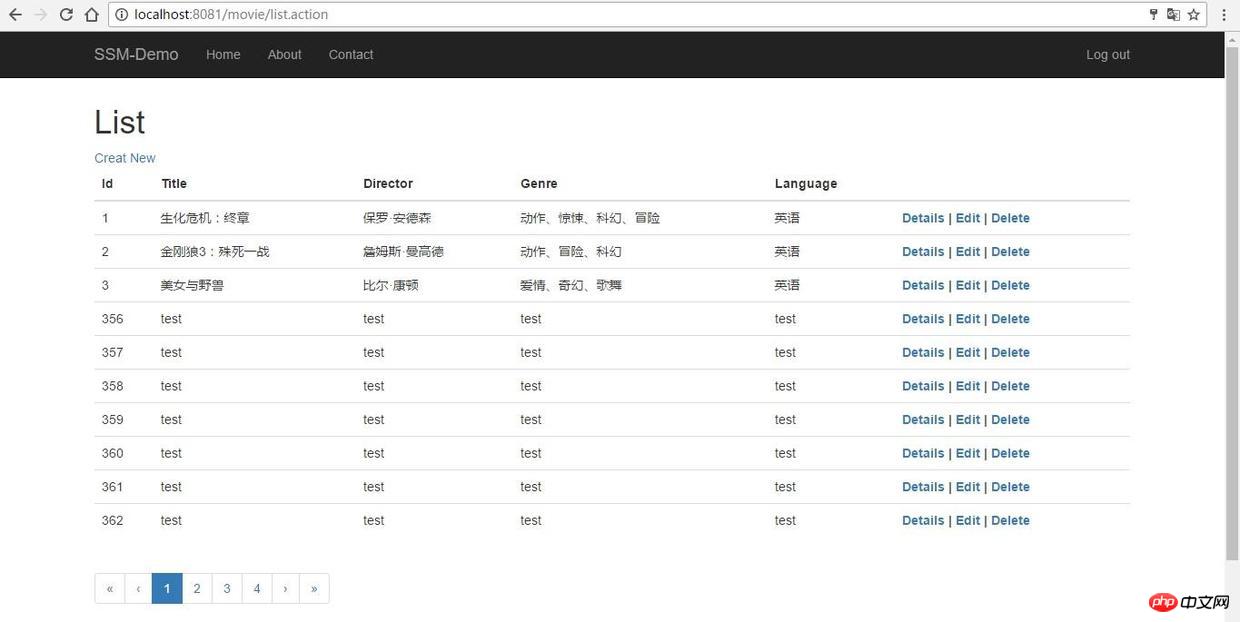

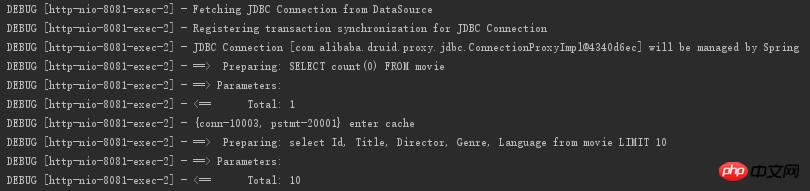
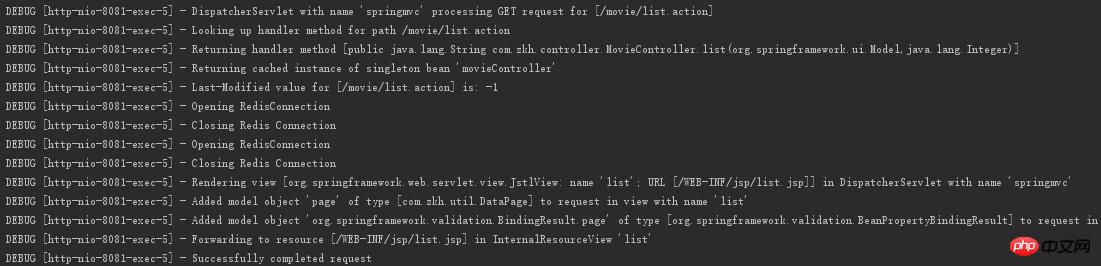
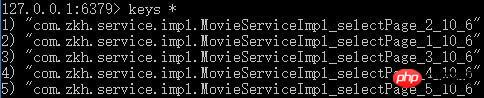
F5 to refresh the page. You can see from the Tomcat console that there is no progress. SQL query, but reads cached data directly from Redis, reducing the burden on the database
The above is the detailed content of Detailed explanation of SSM integration with Redis in Java. For more information, please follow other related articles on the PHP Chinese website!

Hot AI Tools

Undresser.AI Undress
AI-powered app for creating realistic nude photos

AI Clothes Remover
Online AI tool for removing clothes from photos.

Undress AI Tool
Undress images for free

Clothoff.io
AI clothes remover

AI Hentai Generator
Generate AI Hentai for free.

Hot Article
Hot Tools

Notepad++7.3.1
Easy-to-use and free code editor

SublimeText3 Chinese version
Chinese version, very easy to use

Zend Studio 13.0.1
Powerful PHP integrated development environment

Dreamweaver CS6
Visual web development tools

SublimeText3 Mac version
God-level code editing software (SublimeText3)
Hot Topics
 1379
1379
 52
52

 How to build the redis cluster mode
Apr 10, 2025 pm 10:15 PM
How to build the redis cluster mode
Apr 10, 2025 pm 10:15 PM
Redis cluster mode deploys Redis instances to multiple servers through sharding, improving scalability and availability. The construction steps are as follows: Create odd Redis instances with different ports; Create 3 sentinel instances, monitor Redis instances and failover; configure sentinel configuration files, add monitoring Redis instance information and failover settings; configure Redis instance configuration files, enable cluster mode and specify the cluster information file path; create nodes.conf file, containing information of each Redis instance; start the cluster, execute the create command to create a cluster and specify the number of replicas; log in to the cluster to execute the CLUSTER INFO command to verify the cluster status; make
 PHP vs. Python: Understanding the Differences
Apr 11, 2025 am 12:15 AM
PHP vs. Python: Understanding the Differences
Apr 11, 2025 am 12:15 AM
PHP and Python each have their own advantages, and the choice should be based on project requirements. 1.PHP is suitable for web development, with simple syntax and high execution efficiency. 2. Python is suitable for data science and machine learning, with concise syntax and rich libraries.
 How to clear redis data
Apr 10, 2025 pm 10:06 PM
How to clear redis data
Apr 10, 2025 pm 10:06 PM
How to clear Redis data: Use the FLUSHALL command to clear all key values. Use the FLUSHDB command to clear the key value of the currently selected database. Use SELECT to switch databases, and then use FLUSHDB to clear multiple databases. Use the DEL command to delete a specific key. Use the redis-cli tool to clear the data.
 How to use the redis command
Apr 10, 2025 pm 08:45 PM
How to use the redis command
Apr 10, 2025 pm 08:45 PM
Using the Redis directive requires the following steps: Open the Redis client. Enter the command (verb key value). Provides the required parameters (varies from instruction to instruction). Press Enter to execute the command. Redis returns a response indicating the result of the operation (usually OK or -ERR).
 How to read the source code of redis
Apr 10, 2025 pm 08:27 PM
How to read the source code of redis
Apr 10, 2025 pm 08:27 PM
The best way to understand Redis source code is to go step by step: get familiar with the basics of Redis. Select a specific module or function as the starting point. Start with the entry point of the module or function and view the code line by line. View the code through the function call chain. Be familiar with the underlying data structures used by Redis. Identify the algorithm used by Redis.
 How to read redis queue
Apr 10, 2025 pm 10:12 PM
How to read redis queue
Apr 10, 2025 pm 10:12 PM
To read a queue from Redis, you need to get the queue name, read the elements using the LPOP command, and process the empty queue. The specific steps are as follows: Get the queue name: name it with the prefix of "queue:" such as "queue:my-queue". Use the LPOP command: Eject the element from the head of the queue and return its value, such as LPOP queue:my-queue. Processing empty queues: If the queue is empty, LPOP returns nil, and you can check whether the queue exists before reading the element.
 How to make message middleware for redis
Apr 10, 2025 pm 07:51 PM
How to make message middleware for redis
Apr 10, 2025 pm 07:51 PM
Redis, as a message middleware, supports production-consumption models, can persist messages and ensure reliable delivery. Using Redis as the message middleware enables low latency, reliable and scalable messaging.
 How to use redis lock
Apr 10, 2025 pm 08:39 PM
How to use redis lock
Apr 10, 2025 pm 08:39 PM
Using Redis to lock operations requires obtaining the lock through the SETNX command, and then using the EXPIRE command to set the expiration time. The specific steps are: (1) Use the SETNX command to try to set a key-value pair; (2) Use the EXPIRE command to set the expiration time for the lock; (3) Use the DEL command to delete the lock when the lock is no longer needed.
