


 WeChat Applet
Mini Program Development
Detailed graphic and text explanation of how to log in and obtain unionid in WeChat applet
WeChat Applet
Mini Program Development
Detailed graphic and text explanation of how to log in and obtain unionid in WeChat applet
Detailed graphic and text explanation of how to log in and obtain unionid in WeChat applet

This article mainly introduces the relevant information about logging in to WeChat applet to obtain unionid. Friends in need can refer to it
Detailed explanation of logging in to WeChat applet to obtain unionid
First of all, the company has developed mini programs, public account web pages and apps. In the past, openid was used to distinguish users, but openid can only identify the user uniquely in the current mini program or official account. We hope that users can identify users in various products of the company ( For example, the user's uniqueness can be maintained between official accounts, mini programs, and WeChat login in the app. Fortunately, WeChat provides a unionid.
The following is a two-step introduction to the process of obtaining a unionid for a WeChat mini program. .
1. First register the mini program on the WeChat public platform, and then simulate the login process on the mini program.
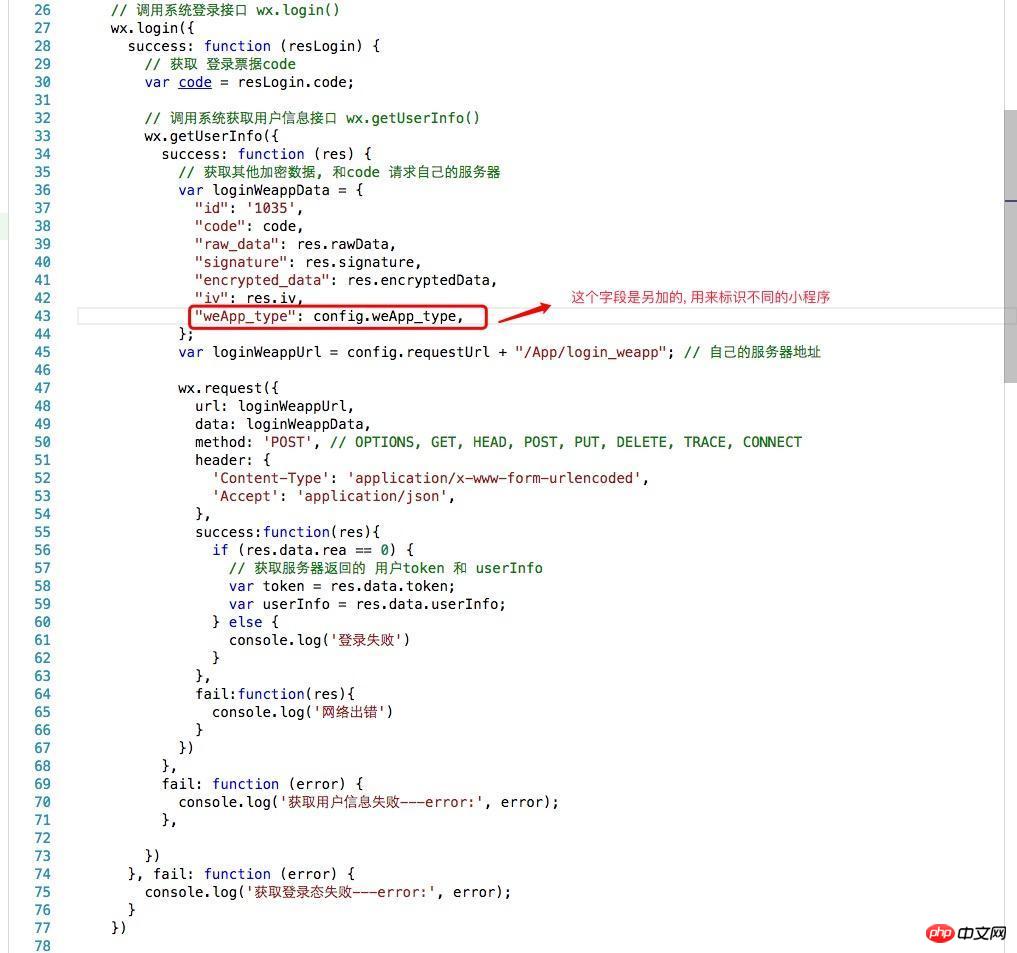
Note: This is just a simple login process. In practice, the login status needs to be maintained. wx.checkSession() can check whether the login status at this time has expired. If it expires, call wx.login() again, otherwise call wx.getUserInfo() User data will not be obtained.
Note: At this time, the backend server receives the code you sent, and then uses appid and appSecret to request WeChat to get openid and session_key encrypted_data , iv and other data, openid and other information can be obtained by decrypting appId, appSecret. (There is no unionid in the solution at this time, then look at the second step)
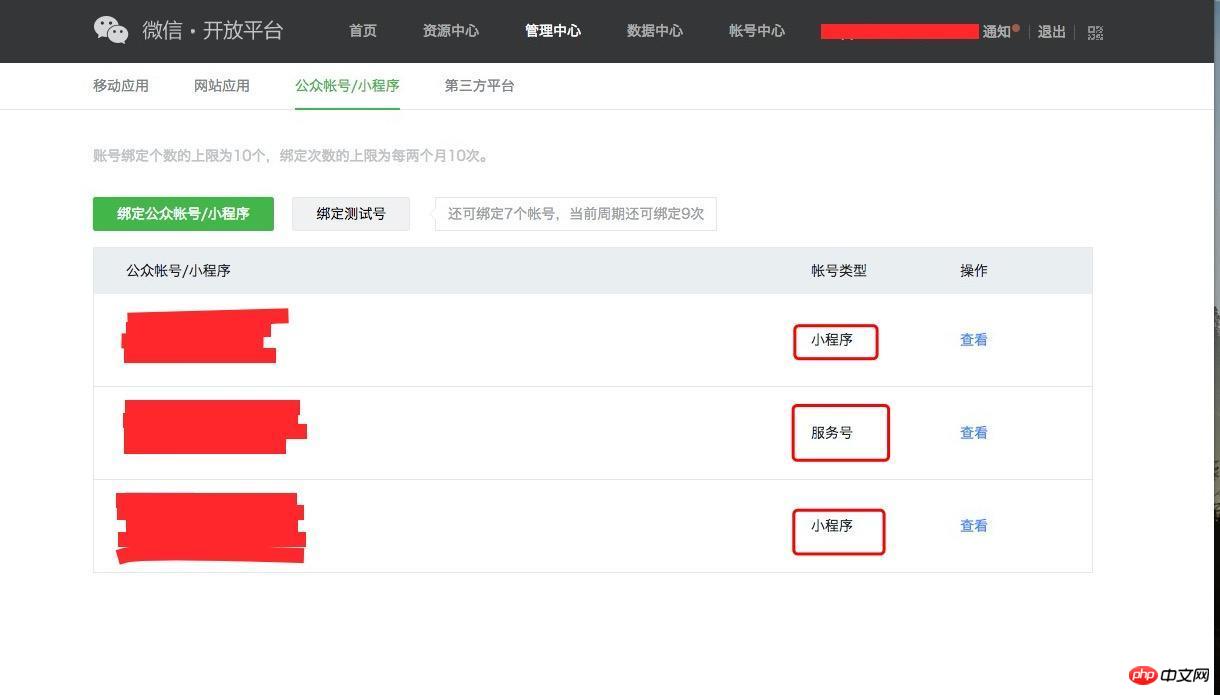
2. Next, go to the WeChat development platform Go to bind the development account.
At first I was a little confused about open platforms and public platforms. Later I saw the management center of the development platform and realized that these mobile applications, website applications or public accounts/mini programs If you can bind the same WeChat development platform account, the same user will have the same unionid for different applications under the same WeChat open platform.
It’s probably set up like the picture above, it will take effect immediately (sometimes it will take a few minutes)
The above is the detailed content of Detailed graphic and text explanation of how to log in and obtain unionid in WeChat applet. For more information, please follow other related articles on the PHP Chinese website!

Hot AI Tools

Undresser.AI Undress
AI-powered app for creating realistic nude photos

AI Clothes Remover
Online AI tool for removing clothes from photos.

Undress AI Tool
Undress images for free

Clothoff.io
AI clothes remover

AI Hentai Generator
Generate AI Hentai for free.

Hot Article
Hot Tools

Notepad++7.3.1
Easy-to-use and free code editor

SublimeText3 Chinese version
Chinese version, very easy to use

Zend Studio 13.0.1
Powerful PHP integrated development environment

Dreamweaver CS6
Visual web development tools

SublimeText3 Mac version
God-level code editing software (SublimeText3)
Hot Topics
 1384
1384
 52
52

 What should I do if I download other people's wallpapers after logging into another account on wallpaperengine?
Mar 19, 2024 pm 02:00 PM
What should I do if I download other people's wallpapers after logging into another account on wallpaperengine?
Mar 19, 2024 pm 02:00 PM
When you log in to someone else's steam account on your computer, and that other person's account happens to have wallpaper software, steam will automatically download the wallpapers subscribed to the other person's account after switching back to your own account. Users can solve this problem by turning off steam cloud synchronization. What to do if wallpaperengine downloads other people's wallpapers after logging into another account 1. Log in to your own steam account, find cloud synchronization in settings, and turn off steam cloud synchronization. 2. Log in to someone else's Steam account you logged in before, open the Wallpaper Creative Workshop, find the subscription content, and then cancel all subscriptions. (In case you cannot find the wallpaper in the future, you can collect it first and then cancel the subscription) 3. Switch back to your own steam
 How do I log in to my previous account on Xiaohongshu? What should I do if the original number is lost after it is reconnected?
Mar 21, 2024 pm 09:41 PM
How do I log in to my previous account on Xiaohongshu? What should I do if the original number is lost after it is reconnected?
Mar 21, 2024 pm 09:41 PM
With the rapid development of social media, Xiaohongshu has become a popular platform for many young people to share their lives and explore new products. During use, sometimes users may encounter difficulties logging into previous accounts. This article will discuss in detail how to solve the problem of logging into the old account on Xiaohongshu, and how to deal with the possibility of losing the original account after changing the binding. 1. How to log in to Xiaohongshu’s previous account? 1. Retrieve password and log in. If you do not log in to Xiaohongshu for a long time, your account may be recycled by the system. In order to restore access rights, you can try to log in to your account again by retrieving your password. The operation steps are as follows: (1) Open the Xiaohongshu App or official website and click the "Login" button. (2) Select "Retrieve Password". (3) Enter the mobile phone number you used when registering your account
 Discuz background login problem solution revealed
Mar 03, 2024 am 08:57 AM
Discuz background login problem solution revealed
Mar 03, 2024 am 08:57 AM
The solution to the Discuz background login problem is revealed. Specific code examples are needed. With the rapid development of the Internet, website construction has become more and more common, and Discuz, as a commonly used forum website building system, has been favored by many webmasters. However, precisely because of its powerful functions, sometimes we encounter some problems when using Discuz, such as background login problems. Today, we will reveal the solution to the Discuz background login problem and provide specific code examples. We hope to help those in need.
 How to log in to Kuaishou PC version - How to log in to Kuaishou PC version
Mar 04, 2024 pm 03:30 PM
How to log in to Kuaishou PC version - How to log in to Kuaishou PC version
Mar 04, 2024 pm 03:30 PM
Recently, some friends have asked me how to log in to the Kuaishou computer version. Here is the login method for the Kuaishou computer version. Friends who need it can come and learn more. Step 1: First, search Kuaishou official website on Baidu on your computer’s browser. Step 2: Select the first item in the search results list. Step 3: After entering the main page of Kuaishou official website, click on the video option. Step 4: Click on the user avatar in the upper right corner. Step 5: Click the QR code to log in in the pop-up login menu. Step 6: Then open Kuaishou on your phone and click on the icon in the upper left corner. Step 7: Click on the QR code logo. Step 8: After clicking the scan icon in the upper right corner of the My QR code interface, scan the QR code on your computer. Step 9: Finally log in to the computer version of Kuaishou
 How to implement dual WeChat login on Huawei mobile phones?
Mar 24, 2024 am 11:27 AM
How to implement dual WeChat login on Huawei mobile phones?
Mar 24, 2024 am 11:27 AM
How to implement dual WeChat login on Huawei mobile phones? With the rise of social media, WeChat has become one of the indispensable communication tools in people's daily lives. However, many people may encounter a problem: logging into multiple WeChat accounts at the same time on the same mobile phone. For Huawei mobile phone users, it is not difficult to achieve dual WeChat login. This article will introduce how to achieve dual WeChat login on Huawei mobile phones. First of all, the EMUI system that comes with Huawei mobile phones provides a very convenient function - dual application opening. Through the application dual opening function, users can simultaneously
 PHP Programming Guide: Methods to Implement Fibonacci Sequence
Mar 20, 2024 pm 04:54 PM
PHP Programming Guide: Methods to Implement Fibonacci Sequence
Mar 20, 2024 pm 04:54 PM
The programming language PHP is a powerful tool for web development, capable of supporting a variety of different programming logics and algorithms. Among them, implementing the Fibonacci sequence is a common and classic programming problem. In this article, we will introduce how to use the PHP programming language to implement the Fibonacci sequence, and attach specific code examples. The Fibonacci sequence is a mathematical sequence defined as follows: the first and second elements of the sequence are 1, and starting from the third element, the value of each element is equal to the sum of the previous two elements. The first few elements of the sequence
 How to enter Baidu Netdisk web version? Baidu Netdisk web version login entrance
Mar 13, 2024 pm 04:58 PM
How to enter Baidu Netdisk web version? Baidu Netdisk web version login entrance
Mar 13, 2024 pm 04:58 PM
Baidu Netdisk can not only store various software resources, but also share them with others. It supports multi-terminal synchronization. If your computer does not have a client downloaded, you can choose to enter the web version. So how to log in to Baidu Netdisk web version? Let’s take a look at the detailed introduction. Baidu Netdisk web version login entrance: https://pan.baidu.com (copy the link to open in the browser) Software introduction 1. Sharing Provides file sharing function, users can organize files and share them with friends in need. 2. Cloud: It does not take up too much memory. Most files are saved in the cloud, effectively saving computer space. 3. Photo album: Supports the cloud photo album function, import photos to the cloud disk, and then organize them for everyone to view.
 How to log in if Xiaohongshu only remembers the account? I just remember how to retrieve my account?
Mar 23, 2024 pm 05:31 PM
How to log in if Xiaohongshu only remembers the account? I just remember how to retrieve my account?
Mar 23, 2024 pm 05:31 PM
Xiaohongshu has now been integrated into the daily lives of many people, and its rich content and convenient operation methods make users enjoy it. Sometimes, we may forget the account password. It is really annoying to only remember the account but not be able to log in. 1. How to log in if Xiaohongshu only remembers the account? When we forget our password, we can log in to Xiaohongshu through the verification code on our mobile phone. The specific operations are as follows: 1. Open the Xiaohongshu App or the web version of Xiaohongshu; 2. Click the "Login" button and select "Account and Password Login"; 3. Click the "Forgot your password?" button; 4. Enter your account number. Click "Next"; 5. The system will send a verification code to your mobile phone, enter the verification code and click "OK"; 6. Set a new password and confirm. You can also use a third-party account (such as
