


An introductory graphic tutorial on SpringBoot in Java

1. What is SpringBoot
In recent years, the concept of microservices has become more and more popular. I believe that when everyone searches for microservices, the first thing that comes into view is SpringBoot and SpringCloud. SpringCloud provides a complete set of microservice solutions, but what is the relationship between SpringBoot and SpringCloud? There’s no point here, SpringBoot can be said to be the foundation of SpringBoot, just like JAVA SE is the only way to advance to JAVA EE. Then we will start with SpringBoot and explore the path of microservices bit by bit. I hope everyone can study together. If there is something wrong with what I wrote, please point it out and lightly complain.
2. Let’s take a simple example
As programmers, everyone is familiar with Hello World, so let’s start my learning journey from Hello World. The poster uses IDEA as a development tool (Amway, IDEA is really easier to use than ECLIPSE).
You can create a SpringBoot project in two ways. As shown in the red box in the figure below:
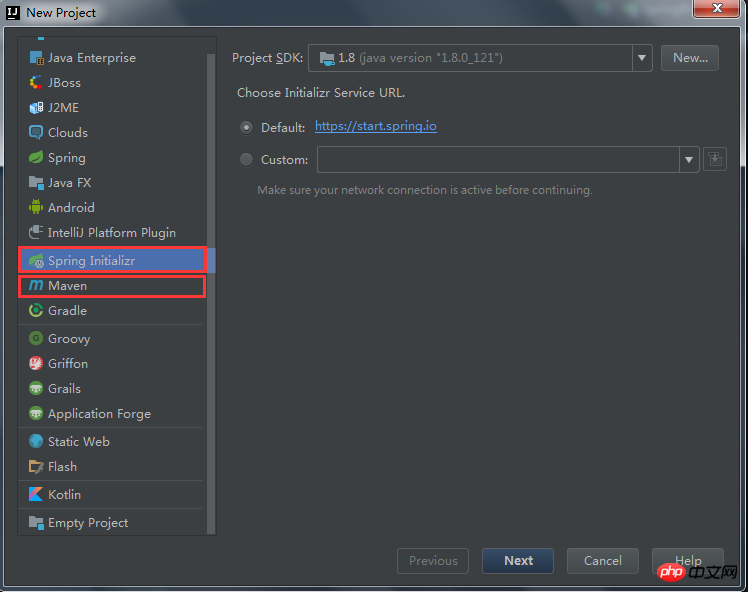
In fact, in my opinion, there is no difference between the two construction methods. To talk about the difference, Spring Initiallizr can help you initialize a simple SpringBoot project (simply a benefit for lazy people), and if you use MAVEN to build it, you need to manually add some SpringBoot dependencies. We use Spring Initiallizr to create it (don't ask the poster why, because the poster is lazy).
Next step, fill in some information about MAVEN

Next step, we try to use the latest version of SpringBoot to build, and leave nothing else selected (don’t ask What are the uses of the options on my left, take your time)

Next step, fill in the project name, click Finish after filling in the project name, wait a moment, and wait for the system to be built Finish.

This is a SpringBoot project we initialized, as shown below:

Next we start to write a simple Hello World project, add spring-boot-starter-web dependency so that the project can be accessed via the web.

Write the HelloWorld code:

Then start the project and the project starts successfully as follows:

Open the browser and enter http://localhost:8080/hello. You can see that we have agreed to Hello SpringBoot!
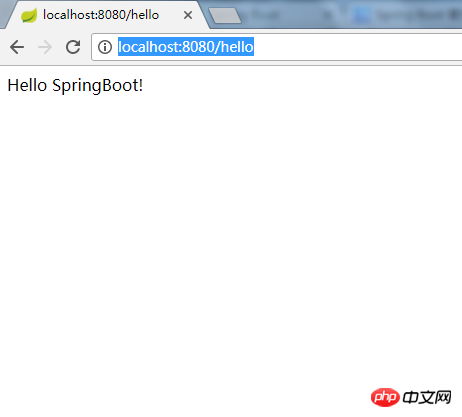
Okay, the first SpringBoot example has been successfully run. After finishing the work, it’s time to sleep. . .
The above is the detailed content of An introductory graphic tutorial on SpringBoot in Java. For more information, please follow other related articles on the PHP Chinese website!

Hot AI Tools

Undresser.AI Undress
AI-powered app for creating realistic nude photos

AI Clothes Remover
Online AI tool for removing clothes from photos.

Undress AI Tool
Undress images for free

Clothoff.io
AI clothes remover

AI Hentai Generator
Generate AI Hentai for free.

Hot Article
Hot Tools

Notepad++7.3.1
Easy-to-use and free code editor

SublimeText3 Chinese version
Chinese version, very easy to use

Zend Studio 13.0.1
Powerful PHP integrated development environment

Dreamweaver CS6
Visual web development tools

SublimeText3 Mac version
God-level code editing software (SublimeText3)
Hot Topics
 1381
1381
 52
52

 Perfect Number in Java
Aug 30, 2024 pm 04:28 PM
Perfect Number in Java
Aug 30, 2024 pm 04:28 PM
Guide to Perfect Number in Java. Here we discuss the Definition, How to check Perfect number in Java?, examples with code implementation.
 Random Number Generator in Java
Aug 30, 2024 pm 04:27 PM
Random Number Generator in Java
Aug 30, 2024 pm 04:27 PM
Guide to Random Number Generator in Java. Here we discuss Functions in Java with examples and two different Generators with ther examples.
 Weka in Java
Aug 30, 2024 pm 04:28 PM
Weka in Java
Aug 30, 2024 pm 04:28 PM
Guide to Weka in Java. Here we discuss the Introduction, how to use weka java, the type of platform, and advantages with examples.
 Smith Number in Java
Aug 30, 2024 pm 04:28 PM
Smith Number in Java
Aug 30, 2024 pm 04:28 PM
Guide to Smith Number in Java. Here we discuss the Definition, How to check smith number in Java? example with code implementation.
 Java Spring Interview Questions
Aug 30, 2024 pm 04:29 PM
Java Spring Interview Questions
Aug 30, 2024 pm 04:29 PM
In this article, we have kept the most asked Java Spring Interview Questions with their detailed answers. So that you can crack the interview.
 Break or return from Java 8 stream forEach?
Feb 07, 2025 pm 12:09 PM
Break or return from Java 8 stream forEach?
Feb 07, 2025 pm 12:09 PM
Java 8 introduces the Stream API, providing a powerful and expressive way to process data collections. However, a common question when using Stream is: How to break or return from a forEach operation? Traditional loops allow for early interruption or return, but Stream's forEach method does not directly support this method. This article will explain the reasons and explore alternative methods for implementing premature termination in Stream processing systems. Further reading: Java Stream API improvements Understand Stream forEach The forEach method is a terminal operation that performs one operation on each element in the Stream. Its design intention is
 TimeStamp to Date in Java
Aug 30, 2024 pm 04:28 PM
TimeStamp to Date in Java
Aug 30, 2024 pm 04:28 PM
Guide to TimeStamp to Date in Java. Here we also discuss the introduction and how to convert timestamp to date in java along with examples.
 Java Program to Find the Volume of Capsule
Feb 07, 2025 am 11:37 AM
Java Program to Find the Volume of Capsule
Feb 07, 2025 am 11:37 AM
Capsules are three-dimensional geometric figures, composed of a cylinder and a hemisphere at both ends. The volume of the capsule can be calculated by adding the volume of the cylinder and the volume of the hemisphere at both ends. This tutorial will discuss how to calculate the volume of a given capsule in Java using different methods. Capsule volume formula The formula for capsule volume is as follows: Capsule volume = Cylindrical volume Volume Two hemisphere volume in, r: The radius of the hemisphere. h: The height of the cylinder (excluding the hemisphere). Example 1 enter Radius = 5 units Height = 10 units Output Volume = 1570.8 cubic units explain Calculate volume using formula: Volume = π × r2 × h (4
