

 Backend Development
Python Tutorial
Detailed example of sending emails with pictures and attachments from Django in Python
Backend Development
Python Tutorial
Detailed example of sending emails with pictures and attachments from Django in Python
Detailed example of sending emails with pictures and attachments from Django in Python

本篇文章主要介绍了Python中Django发送带图片和附件的邮件 ,非常具有实用价值,需要的朋友可以参考下。
最近需要做集团的SRC系统。暂无安全研发,所以只能找我这个小菜兼职开发。系统使用Django框架,在整个过程中,有许多奇特的需求。在某项需求中,需要给厂商用户发送富文本邮件,漏洞详情,这个折腾了一下,感觉略有收获,所以记一篇随笔。
首先我在网上搜索了一些资料,发现都是python通过smtplib发送,使用MIME格式来生成富文本邮件:传送门
我想的是,使用Django框架,框架带了邮件模块,没必要引入smtplib吧。我就想,向上文传送门那样,生成一个MIME文件,然后通过
 from django.core import mail
 mail.send_mail
这种方式把MIMEMultipart对象使用as_string()方法生成的文件当做message发出去不就好了吗。呃,有兴趣的可以试一下。。我发出去了一堆字符串。。
好吧,失败了,难道真的要把smtplib引进来?
天无绝人之路,这个时候我看到了一句话:EmailMessage是Django封装好的smtp。哦?还有这回事?好吧,尝试一下看看源码?跳转至message.py
class EmailMessage(object):
  """
  A container for email information.
  """
  content_subtype = 'plain'
  mixed_subtype = 'mixed'
  encoding = None   # None => use settings default

  def __init__(self, subject='', body='', from_email=None, to=None, bcc=None,
         connection=None, attachments=None, headers=None, cc=None,
         reply_to=None):
    """
    Initialize a single email message (which can be sent to multiple
    recipients).

    All strings used to create the message can be unicode strings
    (or UTF-8 bytestrings). The SafeMIMEText class will handle any
    necessary encoding conversions.
"""恩!大体知道了用法。
msg = mail.EmailMessage('富文本邮件测试', html, from_mail, recipient_list)
就是这样了。而且看message.py文件
if to:
       if isinstance(to, six.string_types):
        raise TypeError('"to" argument must be a list or tuple')
self.to = list(to)看到raise的信息,明白了,我们传给他的recipient_list应该是元组或者列表
self.from_email = from_email or settings.DEFAULT_FROM_EMAIL
我们传给他的就是Django settings.py文件里配置的邮箱,就是以下格式的:
# email config
# 这是我们工程目录下settings文件的配置
EMAIL_BACKEND = 'django.core.mail.backends.smtp.EmailBackend'

EMAIL_HOST_PASSWORD = 'xxxxxxxx'
EMAIL_HOST_USER = 'xxxx@xxxx.xxxx'
EMAIL_HOST = 'smtp.xxxx.com'
EMAIL_PORT = port
好,到此为止,我们知道了这个类怎么用。我们看传送门里的代码,挑选比较重要的
msgRoot = MIMEMultipart('related')
msgRoot['Subject'] = subject
msgRoot['From'] = strFrom
msgRoot['To'] = strTo
msgText = MIMEText(plainText, 'plain', 'utf-8')
msgAlternative.attach(msgText)

#设定HTML信息
msgText = MIMEText(htmlText, 'html', 'utf-8')
msgAlternative.attach(msgText)
然后我们对比一下message.py里面的代码:
def message(self):
    encoding = self.encoding or settings.DEFAULT_CHARSET
    msg = SafeMIMEText(self.body, self.content_subtype, encoding)
    msg = self._create_message(msg)
    msg['Subject'] = self.subject
    msg['From'] = self.extra_headers.get('From', self.from_email)
msg['To'] = self.extra_headers.get('To', ', '.join(map(force_text, self.to)))篇幅所限不粘贴太多,有兴趣可以自己去研读。我们发现,他们是不是很像,其实读完整个message.py我们会发现一件事。原来EmailMessage这个类的对象,可以看做是MIMEMultipart对象加上了smtplib的发送功能。而且它也有attach方法,可以像MIMEMultipart对象那样拼接富文本邮件内容,好,这就有办法了!我们通过EmailMessage来发送富文本邮件!
# -*- coding: utf-8 -*-
# ===============================================================================
# @ Creator:首席小学生
# @ Date:2017-03-28
# 构造富文本邮件内容
# ===============================================================================
import os
from email.mime.image import MIMEImage
from django.conf import settings
from django.core import mail
def add_img(src, img_id):
"""
在富文本邮件模板里添加图片
:param src:
:param img_id:
:return:
"""
fp = open(src, 'rb')
msg_image = MIMEImage(fp.read())
fp.close()
msg_image.add_header('Content-ID', '<'+img_id+'>')
return msg_image
def send_util():
path = os.getcwd()
path_use = path.replace('\\', '/')
html = '''
Title
 牛逼呀小伙子,你成功了
 '''
recipient_list = ['xxxx@xxxx.com']
from_mail = settings.EMAIL_HOST_USER
msg = mail.EmailMessage('富文本邮件测试', html, from_mail, recipient_list)
msg.content_subtype = 'html'
msg.encoding = 'utf-8'
image = add_img(path_use+'/mail_util/test.png', 'test_cid')
msg.attach(image)
if msg.send():
return True
else:
return False
'''
recipient_list = ['xxxx@xxxx.com']
from_mail = settings.EMAIL_HOST_USER
msg = mail.EmailMessage('富文本邮件测试', html, from_mail, recipient_list)
msg.content_subtype = 'html'
msg.encoding = 'utf-8'
image = add_img(path_use+'/mail_util/test.png', 'test_cid')
msg.attach(image)
if msg.send():
return True
else:
return False我们在views中设置视图函数,调用上面这些测试方法尝试一下:
from django.shortcuts import render
from html_to_mail import send_util


def send_mail(request):
  if send_util():
    return render(request, 'ok.html')
  else:
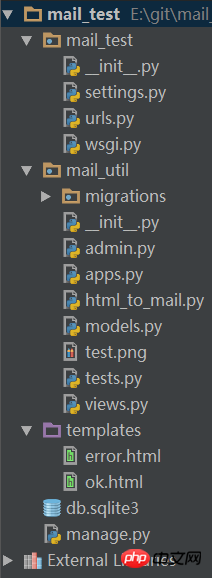
return render(request, 'error.html')在urls里面随意配置一个映射指向这个视图函数,把Django工程run起来,直接在浏览器get这个映射。发现邮件发送成功!
The above is the detailed content of Detailed example of sending emails with pictures and attachments from Django in Python. For more information, please follow other related articles on the PHP Chinese website!

Hot AI Tools

Undresser.AI Undress
AI-powered app for creating realistic nude photos

AI Clothes Remover
Online AI tool for removing clothes from photos.

Undress AI Tool
Undress images for free

Clothoff.io
AI clothes remover

AI Hentai Generator
Generate AI Hentai for free.

Hot Article
Hot Tools

Notepad++7.3.1
Easy-to-use and free code editor

SublimeText3 Chinese version
Chinese version, very easy to use

Zend Studio 13.0.1
Powerful PHP integrated development environment

Dreamweaver CS6
Visual web development tools

SublimeText3 Mac version
God-level code editing software (SublimeText3)
Hot Topics
 1381
1381
 52
52

 PHP and Python: Code Examples and Comparison
Apr 15, 2025 am 12:07 AM
PHP and Python: Code Examples and Comparison
Apr 15, 2025 am 12:07 AM
PHP and Python have their own advantages and disadvantages, and the choice depends on project needs and personal preferences. 1.PHP is suitable for rapid development and maintenance of large-scale web applications. 2. Python dominates the field of data science and machine learning.
 How to train PyTorch model on CentOS
Apr 14, 2025 pm 03:03 PM
How to train PyTorch model on CentOS
Apr 14, 2025 pm 03:03 PM
Efficient training of PyTorch models on CentOS systems requires steps, and this article will provide detailed guides. 1. Environment preparation: Python and dependency installation: CentOS system usually preinstalls Python, but the version may be older. It is recommended to use yum or dnf to install Python 3 and upgrade pip: sudoyumupdatepython3 (or sudodnfupdatepython3), pip3install--upgradepip. CUDA and cuDNN (GPU acceleration): If you use NVIDIAGPU, you need to install CUDATool
 How is the GPU support for PyTorch on CentOS
Apr 14, 2025 pm 06:48 PM
How is the GPU support for PyTorch on CentOS
Apr 14, 2025 pm 06:48 PM
Enable PyTorch GPU acceleration on CentOS system requires the installation of CUDA, cuDNN and GPU versions of PyTorch. The following steps will guide you through the process: CUDA and cuDNN installation determine CUDA version compatibility: Use the nvidia-smi command to view the CUDA version supported by your NVIDIA graphics card. For example, your MX450 graphics card may support CUDA11.1 or higher. Download and install CUDAToolkit: Visit the official website of NVIDIACUDAToolkit and download and install the corresponding version according to the highest CUDA version supported by your graphics card. Install cuDNN library:
 Detailed explanation of docker principle
Apr 14, 2025 pm 11:57 PM
Detailed explanation of docker principle
Apr 14, 2025 pm 11:57 PM
Docker uses Linux kernel features to provide an efficient and isolated application running environment. Its working principle is as follows: 1. The mirror is used as a read-only template, which contains everything you need to run the application; 2. The Union File System (UnionFS) stacks multiple file systems, only storing the differences, saving space and speeding up; 3. The daemon manages the mirrors and containers, and the client uses them for interaction; 4. Namespaces and cgroups implement container isolation and resource limitations; 5. Multiple network modes support container interconnection. Only by understanding these core concepts can you better utilize Docker.
 Python vs. JavaScript: Community, Libraries, and Resources
Apr 15, 2025 am 12:16 AM
Python vs. JavaScript: Community, Libraries, and Resources
Apr 15, 2025 am 12:16 AM
Python and JavaScript have their own advantages and disadvantages in terms of community, libraries and resources. 1) The Python community is friendly and suitable for beginners, but the front-end development resources are not as rich as JavaScript. 2) Python is powerful in data science and machine learning libraries, while JavaScript is better in front-end development libraries and frameworks. 3) Both have rich learning resources, but Python is suitable for starting with official documents, while JavaScript is better with MDNWebDocs. The choice should be based on project needs and personal interests.
 How to choose the PyTorch version under CentOS
Apr 14, 2025 pm 02:51 PM
How to choose the PyTorch version under CentOS
Apr 14, 2025 pm 02:51 PM
When selecting a PyTorch version under CentOS, the following key factors need to be considered: 1. CUDA version compatibility GPU support: If you have NVIDIA GPU and want to utilize GPU acceleration, you need to choose PyTorch that supports the corresponding CUDA version. You can view the CUDA version supported by running the nvidia-smi command. CPU version: If you don't have a GPU or don't want to use a GPU, you can choose a CPU version of PyTorch. 2. Python version PyTorch
 MiniOpen Centos compatibility
Apr 14, 2025 pm 05:45 PM
MiniOpen Centos compatibility
Apr 14, 2025 pm 05:45 PM
MinIO Object Storage: High-performance deployment under CentOS system MinIO is a high-performance, distributed object storage system developed based on the Go language, compatible with AmazonS3. It supports a variety of client languages, including Java, Python, JavaScript, and Go. This article will briefly introduce the installation and compatibility of MinIO on CentOS systems. CentOS version compatibility MinIO has been verified on multiple CentOS versions, including but not limited to: CentOS7.9: Provides a complete installation guide covering cluster configuration, environment preparation, configuration file settings, disk partitioning, and MinI
 How to operate distributed training of PyTorch on CentOS
Apr 14, 2025 pm 06:36 PM
How to operate distributed training of PyTorch on CentOS
Apr 14, 2025 pm 06:36 PM
PyTorch distributed training on CentOS system requires the following steps: PyTorch installation: The premise is that Python and pip are installed in CentOS system. Depending on your CUDA version, get the appropriate installation command from the PyTorch official website. For CPU-only training, you can use the following command: pipinstalltorchtorchvisiontorchaudio If you need GPU support, make sure that the corresponding version of CUDA and cuDNN are installed and use the corresponding PyTorch version for installation. Distributed environment configuration: Distributed training usually requires multiple machines or single-machine multiple GPUs. Place
