


Terraria: How To Get Obsidian Skin Potions

If you're exploring the caves of Terraria, chances are you'll come across lava, and if you get down to the Hell biome, the place is absolutely full of it. There are massive lakes of lava, pockets of lava around the ash and Hellstone, lava inside ruined buildings, and enemies can even release it on death on certain difficulties.

If you wade in without protection, you'll quickly be burnt to death and lose valuable currency alongside getting sent back to your spawn, throwing a proverbial wrench in whatever you were doing. Some accessories can help, but it takes a while to get them and takes up valuable slots. Get some Obsidian Skin Potions instead, and make dealing with lava easy.
How To Get Obsidian Skin Potions

There are two ways to get Obsidian Skin Potions: crafting them yourself at either an Alchemy Table or Crafting Bench with a Glass Bottle placed on it or finding them in certain types of crates and chests in the world.
How To Craft Obsidian Skin Potions
Crafting them yourself is the more sustainable option, but it requires visiting both the Desert and Hell at least once and digging or exploring down far enough to obtain a decent supply of Obsidian.
|
Potion Material |
How To Obtain |
|---|---|
|
Bottled Water x1 |
Craft with a Glass Bottle when near or standing in a body of water at least four tiles wide, or when near a sink. |
|
Fireblossom x1 |
Found growing in The Underworld biome on Ash Blocks or when opening a Herb Bag. |
|
Waterleaf x1 |
Found growing in the Desert biome on Sand Blocks or when opening a Herb Bag. |
|
Obsidian x1 |
Made when Water and Lava collide in any biome or at any height. |
Where To Find Obsidian Skin Potions

With chests, they can only be found in Shadow Chests, one of two main chest types found in the Hell biome, and these need a Shadow Key to unlock them, so you'll have to beat the Skeleton at least once and unlock at least one Dungeon Chest.
- Each Shadow Chest has around a ten percent chance of containing one to three Obsidian Skin Potions.
You can also occasionally find Obsidian Skin Potions when breaking vases found in Ruined Houses in the Underworld biome.
As for crates, you can find Obsidian Skin Potions in any type of pre-Hardmode or Hardmode type, with the only difference between them being when they're available and your chance of getting the potion from them.
You can use the crates to obtain the potions much earlier as they can be fished up in any biome and with any type of fishing rod, and have some Obsidian Skin Potions available before you get to Hell and can begin getting Fireblossoms to craft them yourself.
- Crates with a one in 70 chance for the potion can drop between one and three Obsidian Skin potions.
- Crates with a one in 15 chance for the potion can drop between two and five Obsidian Skin potions.
- All other crates have a chance to drop between two and four Obsidian Skin potions.
You can use Fishing Rods with a higher Fishing Power and buffing potions and items like the Fishing Potion, Crate Potion, and Angler Earring to increase your chances of hooking a crate.
Crate Drop Rates For Obsidian Skin Potions
Crate Type Chance To Drop Potions Amount Dropped Biome Found In Mode Found In
Azure Crate
1/24
2 to 4
Space
Floating Islands
Hardmode
Boreal Crate
1/24
2 to 4
Snow
Ice
Hardmode
Bramble Crate
1/24
2 to 4
Jungle
Hardmode
Corrupt Crate
1/24
2 to 4
Corruption
Pre-Hardmode
Crimson Crate
1/24
2 to 4
Crimson
Pre-Hardmode
Defiled Crate
1/24
2 to 4
Corruption
Hardmode
Divine Crate
1/24
2 to 4
The Hallow
Hardmode
Dungeon Crate
1/24
2 to 4
Dungeon
Pre-Hardmode
Frozen Crate
1/24
2 to 4
Snow
Ice
Pre-Hardmode
Golden Crate
1/15
2 to 5
Any Biome
Hardmode
Hallowed Crate
1/24
2 to 4
Artificial Hallow Biome in Pre-Hardmode
Throwing a Divine Crate into Shimmer.
Pre-Hardmode
Hardmode
Hellstone Crate
1/24
2 to 4
Any Biome (Lava Only)
Hardmode
Iron Crate
1/32
2 to 4
Any Biome
Pre-Hardmode
Jungle Crate
1/24
2 to 4
Jungle
Pre-Hardmode
Mirage Crate
1/24
2 to 4
Desert
Hardmode
Mythril Crate
1/32
2 to 4
Any Biome
Hardmode
Oasis Crate
1/24
2 to 4
Desert
Pre-Hardmode
Obsidian Crate
1/24
2 to 4
Any Biome (Lava Only)
Pre-Hardmode
Ocean Crate
1/24
2 to 4
Ocean
Pre-Hardmode
Pearlwood Crate
1/70
1 to 3
Any Biome
Hardmode
Sky Crate
1/24
2 to 4
Space
Floating Islands
Pre-Hardmode
Titanium Crate
1/15
2 to 5
Any Biome
Hardmode
Wooden Crate
1/70
1 to 3
Any Biome
Pre-Hardmode

The above is the detailed content of Terraria: How To Get Obsidian Skin Potions. For more information, please follow other related articles on the PHP Chinese website!

Hot AI Tools

Undresser.AI Undress
AI-powered app for creating realistic nude photos

AI Clothes Remover
Online AI tool for removing clothes from photos.

Undress AI Tool
Undress images for free

Clothoff.io
AI clothes remover

AI Hentai Generator
Generate AI Hentai for free.

Hot Article
Hot Tools

Notepad++7.3.1
Easy-to-use and free code editor

SublimeText3 Chinese version
Chinese version, very easy to use

Zend Studio 13.0.1
Powerful PHP integrated development environment

Dreamweaver CS6
Visual web development tools

SublimeText3 Mac version
God-level code editing software (SublimeText3)
Hot Topics
 1378
1378
 52
52

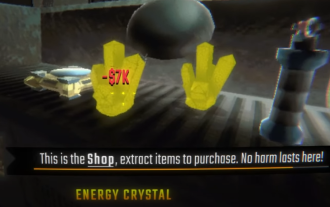 R.E.P.O. Energy Crystals Explained and What They Do (Yellow Crystal)
Mar 18, 2025 am 12:07 AM
R.E.P.O. Energy Crystals Explained and What They Do (Yellow Crystal)
Mar 18, 2025 am 12:07 AM
I bought expensive weapons or drones in R.E.P.O. but found that the energy was exhausted and became useless? Don't worry, you don't have to spend $50,000 on replacements, just charge your gear! That strange machine at the back of your truck is not a decoration. Here are how to get energy crystals and use them to keep your gear running continuously to avoid bankruptcy. More Reads: All R.E.P.O. Items How to get energy crystal You can buy energy crystals from the service store between levels. They usually cost between $7,000 and $9,000 — while expensive, they are far cheaper than repurchasing gear. In the first few levels, no purchase is required. You don't need them for the time being, so
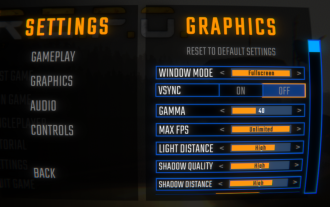 R.E.P.O. Best Graphic Settings
Mar 18, 2025 am 01:33 AM
R.E.P.O. Best Graphic Settings
Mar 18, 2025 am 01:33 AM
R.E.P.O. Game Screen Setting Guide: How to improve frame rate while ensuring picture quality? This article will guide you to optimize game settings and find the best balance point. Step 1: Full Screen Mode and Frame Rate Adjustment Before adjusting other settings, make sure the game is running in the best mode: Display Mode: Full Screen - Always use Full Screen Mode for optimal performance. Window mode will reduce the frame rate. Vertical Sync (V-Sync): Off - Unless a screen tear occurs, turn off vertical synchronization for a smoother gaming experience. Maximum FPS: Unlimited - If your computer is configured strongly, you can set it to Unlimited. Otherwise, it is recommended to limit it to 60 frames or match your monitor refresh rate. second
 Assassin's Creed Shadows: Seashell Riddle Solution
Mar 28, 2025 am 01:58 AM
Assassin's Creed Shadows: Seashell Riddle Solution
Mar 28, 2025 am 01:58 AM
Assassin's Creed: Shadows boasts a vast world brimming with activities beyond the main storyline. Side missions and various encounters significantly enrich the immersive experience of in-game Japan. One particularly memorable encounter is the Seashe
 R.E.P.O. How to Fix Audio if You Can't Hear Anyone
Mar 17, 2025 pm 06:10 PM
R.E.P.O. How to Fix Audio if You Can't Hear Anyone
Mar 17, 2025 pm 06:10 PM
Can't hear other players' voices in the R.E.P.O. game? Even if your microphone is working properly, it can be a problem caused by audio settings or device conflicts. Here are some effective solutions to help you restore your voice chat functionality. 1. Check the output device Open the audio settings of R.E.P.O. and check the output device settings. If set to "Default", manually select your headset or speaker. Restart the game and test voice chat again. 2. Adjust Windows sound settings If R.E.P.O. does not output the sound to the correct device, check the Windows Sound Settings: Right-click the speaker icon in the taskbar and select Sound Settings. Under "Output",
 R.E.P.O. Chat Commands and How to Use Them
Mar 17, 2025 pm 06:13 PM
R.E.P.O. Chat Commands and How to Use Them
Mar 17, 2025 pm 06:13 PM
R.E.P.O. provides some convenient chat instructions in the game to help you optimize the gaming experience. These instructions do not affect game balance, but are useful for taking clear screenshots or setting up visuals for content creation. How to use chat commands in R.E.P.O. To activate the command, please follow the steps below: Press the “T” key to open the chat window. Enter the “/” symbol, and then enter the command you want to use. Press Enter and the effect will take effect. To cancel the effect, enter the same command again or restart the game. Please note that these commands are only valid in multiplayer games and are not available in single player mode. Available chat commands /cinematic commands remove the game world
 Will R.E.P.O. Have Crossplay?
Mar 18, 2025 am 01:07 AM
Will R.E.P.O. Have Crossplay?
Mar 18, 2025 am 01:07 AM
At present, "R.E.P.O." does not support cross-platform games, and the official has not confirmed whether it will support it in the future. The game is currently only available on PC platforms (early experience through Steam), so console players are temporarily unable to play. Why does R.E.P.O. not support cross-platform games? Released on PC platforms only – The console version of the game has not been announced yet. Early Access Phase – Developers are still refining the game, and cross-platform gaming is not a current priority. Host porting is not confirmed – without a host version, cross-platform gaming is simply impossible. Will cross-platform games be supported in the future? There is no official news on whether R.E.P.O. will launch a console version and whether it will support cross-platform games. However,
 Where to find the Crane Control Keycard in Atomfall
Mar 28, 2025 am 02:17 AM
Where to find the Crane Control Keycard in Atomfall
Mar 28, 2025 am 02:17 AM
In Atomfall, discover hidden keys and passages, including multiple ways to access key locations. This guide focuses on using the Crane Control Keycard for easy, unguarded Entry to Skethermoor Prison, bypassing the need to cooperate with Captain Sims
 Saving in R.E.P.O. Explained (And Save Files)
Mar 19, 2025 am 12:22 AM
Saving in R.E.P.O. Explained (And Save Files)
Mar 19, 2025 am 12:22 AM
Want to save progress in R.E.P.O.? Good news: You can! Bad news: Only under very specific conditions…but this will change soon. Read more about the upcoming update that involves a new save menu and multiple save slots. Save mechanism Complete the game run once, then exit from the menu and do not start another game immediately. If you do it correctly, your progress will be saved to continue from where you last left. If everyone dies, your save will be deleted – no second chance. The game will simply erase your existence as if you never existed. Basically, if you complete a level and want to keep your progress, make sure to stop and exit before jumping into another task. This means
