


Pokemon Pocket: 7 Beginner Tips

Pokemon TCG Pocket is a card-collecting game where you can amass a collection of beautiful Pokemon cards. Once you've built up your collection, you can build a variety of decks using 20 cards, then battle other players or challenge NPC trials.

With so many cards, decks, and cosmetic options, it can be difficult to know where to start or what to focus on first. Luckily, that's where we come in. Below, we'll take a look at several tips for beginners to Pokemon TCG Pocket to help you start your new journey.
Focus On One Pack Type

Every 12 hours, you can open one card pack for free, but you can keep opening packs as long as you have Pack Hourglasses. There are three different packs to choose from in the Genetic Apex expansion: Mewtwo, Charizard, and Pikachu. It may sound like a good idea to pull from a mixture of all three types, but it's actually better to focus on just one.
The reason for this is that each pack type has a different set of cards, and to build a viable deck, you'll often need two of each card you want to include. This means to get all the cards you'll need for potential decks, you'll want to focus on only opening cards from that pack type, at least until you get the cards you need.
Save Up Pack Points

Every time you open a pack, you'll get five Pack Points, which you can then spend at the Pack Point Exchange for any card of your choosing. Of course, the rarer the card, the more Pack Points it costs to buy it. We recommend saving up your Pack Points to buy an EX card you need to complete a deck, or rare three or four-diamond cards.
From the Pack Point Exchange, if you select a card, you can also add it to your Wishlist. Wishlisted cards that show up in Wonder Pick options will be marked with a heart to conveniently help you decide where to spend your Wonder Stamina.
Build Your First Deck

After you've collected enough cards, you'll want to start crafting your first competitive deck. If you're brand new to Pokemon TCG, you may be lost during this step, without the knowledge of competitive meta, which cards are good, which cards go into a deck, and so on.
Luckily, you have a few options to help you craft your first deck. The first is to look them up online; there are tons of resources from other players about good decks and budget options that will help you decide where to start.
Alternatively, you can try collecting the cards from the pre-made Themed Decks, which offer decent starting options. You can find these decks in the Deck Missions tab, where you can see which 20 cards you need to complete them.
Fill Out Themed Collections

Themed Collections are a special type of mission that involves collecting groups of specific cards. For example, the First Choice Themed Collection requires you to collect any Bulbasaur, Charmander, and Squirtle card. Completing a Themed Collection will reward you with currency like Wonder Hourglasses, Shop Tickets, and Emblem Tickets.
Working towards completing Themed Collections is a good way to stock up on some extra currency, especially for Themed Collections that reward you with Hourglasses.
Get Missing Cards From Wonder Pick

Wonder Pick lets you pick a random card from another player's recently opened pack. Every card has an equal 20 percent chance to be chosen, but the cost of picking from a pack varies depending on the rarity of the cards it selects from.
In selections that include one or more rare cards, you'll have to spend three, four, or five Wonder Stamina at a time, and you're still not guaranteed to get the card you want. This means you'll want to weigh the pros and cons of each Wonder Pick selection before you spend your Stamina on it, as it recovers much more slowly than Pack Stamina does.
If you can deal with the potential pain of losing an RNG roll, it may be a good idea to use Wonder Pick exclusively to get EX cards. Even at a 20 percent chance, this is one of the best ways to get these cards, as they are rare when opening packs yourself and cost quite a bit in the Pack Point Exchange.
Set Up And Share Binders

After reaching level six, you can make your own Binders. These are custom collections filled with cards of your choosing, allowing you to showcase your collection. Binders have a Cover and any 30 cards from your collection you want to include. You can also add tags such as Holo Cards, Favorite Illustrations, EX Pokemon, and so on.
If you make your Binder visible to the Public, you can also receive likes from other players. For every like you get, you'll get one Shop Ticket, up to five times a day. You can also get likes if someone Thanks you after using your Wonder Pick, or after a Versus battle.
Sharing your Binder is a great way to build up Shop Tickets every day, which can then be spent on extra Pack Hourglasses or Wonder Hourglasses.
Upgrade Cards With Shinedust

As you open more and more packs, you're Bound to get duplicate copies of cards you already own. Luckily, these don't need to go to waste, as you can use duplicates and a little bit of Shinedust to add a Flair to your cards.
Shinedust can be earned every time you level up or obtain a duplicate card.
The number of duplicate cards and Shinedust you need to add a Flair depends on the rarity of the card. Adding a Flair has no mechanical advantage; it doesn't necessarily make the card stronger, but it does make it stand out more in battle.
Additionally, the more you upgrade the Flair of your card, the more intense the effect will become, and you can even get unique effects like fireballs raining across the card, musical notes dancing around, twinkling colored lights, and many more.

The above is the detailed content of Pokemon Pocket: 7 Beginner Tips. For more information, please follow other related articles on the PHP Chinese website!

Hot AI Tools

Undresser.AI Undress
AI-powered app for creating realistic nude photos

AI Clothes Remover
Online AI tool for removing clothes from photos.

Undress AI Tool
Undress images for free

Clothoff.io
AI clothes remover

AI Hentai Generator
Generate AI Hentai for free.

Hot Article
Hot Tools

Notepad++7.3.1
Easy-to-use and free code editor

SublimeText3 Chinese version
Chinese version, very easy to use

Zend Studio 13.0.1
Powerful PHP integrated development environment

Dreamweaver CS6
Visual web development tools

SublimeText3 Mac version
God-level code editing software (SublimeText3)
Hot Topics
 1378
1378
 52
52

 R.E.P.O. Energy Crystals Explained and What They Do (Yellow Crystal)
Mar 18, 2025 am 12:07 AM
R.E.P.O. Energy Crystals Explained and What They Do (Yellow Crystal)
Mar 18, 2025 am 12:07 AM
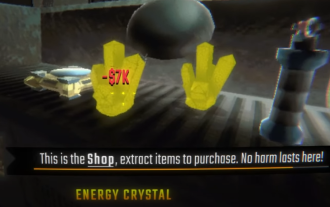
I bought expensive weapons or drones in R.E.P.O. but found that the energy was exhausted and became useless? Don't worry, you don't have to spend $50,000 on replacements, just charge your gear! That strange machine at the back of your truck is not a decoration. Here are how to get energy crystals and use them to keep your gear running continuously to avoid bankruptcy. More Reads: All R.E.P.O. Items How to get energy crystal You can buy energy crystals from the service store between levels. They usually cost between $7,000 and $9,000 — while expensive, they are far cheaper than repurchasing gear. In the first few levels, no purchase is required. You don't need them for the time being, so
 R.E.P.O. Best Graphic Settings
Mar 18, 2025 am 01:33 AM
R.E.P.O. Best Graphic Settings
Mar 18, 2025 am 01:33 AM
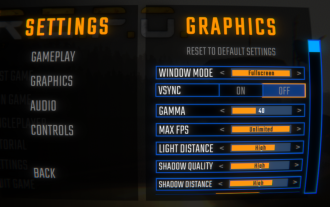
R.E.P.O. Game Screen Setting Guide: How to improve frame rate while ensuring picture quality? This article will guide you to optimize game settings and find the best balance point. Step 1: Full Screen Mode and Frame Rate Adjustment Before adjusting other settings, make sure the game is running in the best mode: Display Mode: Full Screen - Always use Full Screen Mode for optimal performance. Window mode will reduce the frame rate. Vertical Sync (V-Sync): Off - Unless a screen tear occurs, turn off vertical synchronization for a smoother gaming experience. Maximum FPS: Unlimited - If your computer is configured strongly, you can set it to Unlimited. Otherwise, it is recommended to limit it to 60 frames or match your monitor refresh rate. second
 Assassin's Creed Shadows: Seashell Riddle Solution
Mar 28, 2025 am 01:58 AM
Assassin's Creed Shadows: Seashell Riddle Solution
Mar 28, 2025 am 01:58 AM
Assassin's Creed: Shadows boasts a vast world brimming with activities beyond the main storyline. Side missions and various encounters significantly enrich the immersive experience of in-game Japan. One particularly memorable encounter is the Seashe
 R.E.P.O. How to Fix Audio if You Can't Hear Anyone
Mar 17, 2025 pm 06:10 PM
R.E.P.O. How to Fix Audio if You Can't Hear Anyone
Mar 17, 2025 pm 06:10 PM
Can't hear other players' voices in the R.E.P.O. game? Even if your microphone is working properly, it can be a problem caused by audio settings or device conflicts. Here are some effective solutions to help you restore your voice chat functionality. 1. Check the output device Open the audio settings of R.E.P.O. and check the output device settings. If set to "Default", manually select your headset or speaker. Restart the game and test voice chat again. 2. Adjust Windows sound settings If R.E.P.O. does not output the sound to the correct device, check the Windows Sound Settings: Right-click the speaker icon in the taskbar and select Sound Settings. Under "Output",
 R.E.P.O. Chat Commands and How to Use Them
Mar 17, 2025 pm 06:13 PM
R.E.P.O. Chat Commands and How to Use Them
Mar 17, 2025 pm 06:13 PM
R.E.P.O. provides some convenient chat instructions in the game to help you optimize the gaming experience. These instructions do not affect game balance, but are useful for taking clear screenshots or setting up visuals for content creation. How to use chat commands in R.E.P.O. To activate the command, please follow the steps below: Press the “T” key to open the chat window. Enter the “/” symbol, and then enter the command you want to use. Press Enter and the effect will take effect. To cancel the effect, enter the same command again or restart the game. Please note that these commands are only valid in multiplayer games and are not available in single player mode. Available chat commands /cinematic commands remove the game world
 Will R.E.P.O. Have Crossplay?
Mar 18, 2025 am 01:07 AM
Will R.E.P.O. Have Crossplay?
Mar 18, 2025 am 01:07 AM
At present, "R.E.P.O." does not support cross-platform games, and the official has not confirmed whether it will support it in the future. The game is currently only available on PC platforms (early experience through Steam), so console players are temporarily unable to play. Why does R.E.P.O. not support cross-platform games? Released on PC platforms only – The console version of the game has not been announced yet. Early Access Phase – Developers are still refining the game, and cross-platform gaming is not a current priority. Host porting is not confirmed – without a host version, cross-platform gaming is simply impossible. Will cross-platform games be supported in the future? There is no official news on whether R.E.P.O. will launch a console version and whether it will support cross-platform games. However,
 Where to find the Crane Control Keycard in Atomfall
Mar 28, 2025 am 02:17 AM
Where to find the Crane Control Keycard in Atomfall
Mar 28, 2025 am 02:17 AM
In Atomfall, discover hidden keys and passages, including multiple ways to access key locations. This guide focuses on using the Crane Control Keycard for easy, unguarded Entry to Skethermoor Prison, bypassing the need to cooperate with Captain Sims
 Saving in R.E.P.O. Explained (And Save Files)
Mar 19, 2025 am 12:22 AM
Saving in R.E.P.O. Explained (And Save Files)
Mar 19, 2025 am 12:22 AM
Want to save progress in R.E.P.O.? Good news: You can! Bad news: Only under very specific conditions…but this will change soon. Read more about the upcoming update that involves a new save menu and multiple save slots. Save mechanism Complete the game run once, then exit from the menu and do not start another game immediately. If you do it correctly, your progress will be saved to continue from where you last left. If everyone dies, your save will be deleted – no second chance. The game will simply erase your existence as if you never existed. Basically, if you complete a level and want to keep your progress, make sure to stop and exit before jumping into another task. This means
