


Enhance Node.js Server Performance with Worker Threads

Scenarios:
Before we dive into worker threads, let's consider some scenarios...
Suppose a client uploads a large file to a server that needs to be modified or involves processing thousands of data points in the background. If the server waits for this task to finish, the client is left waiting and unable to explore other features. Imagine if a client had to wait for 5 minutes without being able to do anything else—this would be frustrating and far from user-friendly!
Consider another situation where you upload a profile image, and it takes a long time to process, convert, and store in the database. During this time, if the server prevents you from performing other tasks, it significantly reduces the user experience.
In the first case, wouldn't it be better if the server allowed you to explore other features while the file is still being processed? This way, you wouldn't have to wait (since the server wouldn't block you), resulting in a smoother experience.
In the second case, what if the image processing happens in the background, allowing you to continue using other features without waiting?
Solution:
So, what's an effective way to optimize the system's performance in these scenarios? While there are several approaches, using worker threads is a great solution. Worker threads were introduced in Node.js version 10 and are especially useful for performing CPU-intensive tasks in parallel, reducing the load on the main CPU.
Worker threads operate in the background, creating a separate thread that handles intensive computations without blocking the main thread, thus allowing the server to remain responsive for other tasks. While JavaScript is traditionally a single-threaded language and Node.js operates in a single-threaded environment, worker threads enable multithreading by distributing operations across multiple threads. This parallel execution optimizes resource usage and significantly reduces processing time.
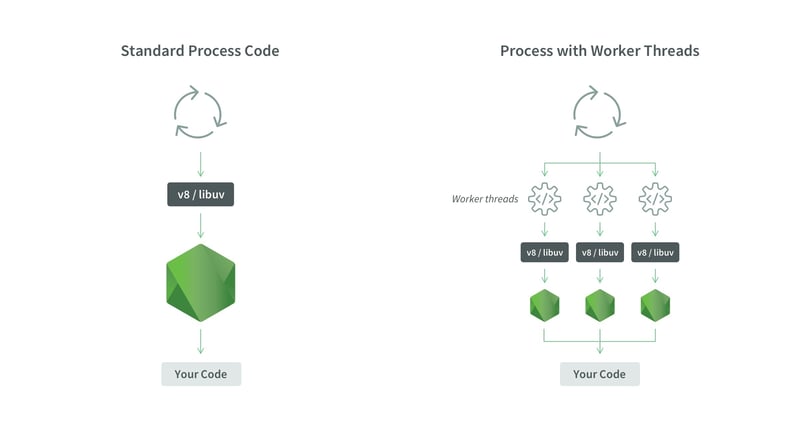
Implementation of worker_thread:
Today we will implement a simple nodejs application with default package worker_threads . First create an express server where a simple get request executes.
First initialize the project:
$ npm init -y
Install express module and nodemon:
$ npm i express nodemon
Creating a simple nodejs server which runs on port 3000.
Import express from ‘express’;
const app = express();
const port = 3000;


// Basic endpoint to test server
app.get(‘/’, (req, res) => {
   res.send(‘Hello World!’);
});


app.listen(port, () => console.log(`Server running on port ${port}`));
Here we created a server which will run on port 3000.
To run, let's modify our package.json file.
Add type as module as below to get the ES6 modules. Also modify under the scripts portion as below.
{
 "name": "worker_express",
 "version": "1.0.0",
 "description": "",
 "main": "index.js",
 "type": "module",
 "scripts": {
   "test": "echo \"Error: no test specified\" && exit 1",
   "start": "node index.js",
   "dev": "nodemon index.js"
 },
 "keywords": [],
 "author": "",
 "license": "ISC",
 "dependencies": {
   "dotenv": "^16.4.5",
   "express": "^4.19.2",
   "nodemon": "^3.1.4"
 }
}
Now let’s run our application as dev mode with nodemon:
$ npm run dev
You will see the message Server running on port 3000. Now go to the localhost:3000 and you can see the Hello World! As far we did just a simple nodejs express server.
Now lets’ create another file named service.js
Here we can create a fibonacci sequence function that finds the nth number fibonacci sequence.
// service.js
function fibonacci(n) {
   if (n <= 1) return 1;
   return fibonacci(n-1) + fibonacci(n-2);
}


export default fibonacci;
Now let’s add another api endpoint to the index.js file and call the fibonacci function from the service.js file. We will calculate the 40th Fibonacci number as an example.
import fibonacci from "./service.js";


// Fibonacci endpoint
app.get('/fibonacci', (req, res) => {
   fibonacci(40)
   res.send('fibonacci called');
})
If you hit the URL http://localhost:3000/fibonacci, you will see that it delays a bit, making you wait. The delay time depends on the computation.

You can try again by commenting the function and see it takes less time which is about millisecond.

In this case you might have to do other heavy operations which are time consuming and reduce performance.
In this case, we can use the worker_threads module, which has been available by default in Node.js since version 10. Now let’s modify the code to apply worker_threads and see the effect.
Import Worker from worker_thread which is node js default package.
import { Worker } from "worker_threads";
Now modify the api endpoint like below.
// Endpoint using worker thread for CPU-intensive task
app.get('/fibonacci', (req, res) => {
   const worker = new Worker('./service.js', {workerData: 40});

   // Handle messages from worker thread
   worker.on('message', (resolve) => console.log(resolve));


   res.send('fibonacci called');
})
Here, we create a worker instance and set the file name service.js as the first argument, while the second argument passes parameters through workerData. You can change the workerData parameter to any other data instead of 40.
worker.on(‘message’, ….) This sets up an event listener on the worker for the ‘message’ event. The message event is emitted by the worker when it sends data back to the main thread using parentrPort.postMessage(...).
(resolve) => console.log(resolve) this is a callback function that will be executed when the worker sends back the data after operation. The received message(data) is passed to this function as the resolve parameter.
Now let’s update our service.js file.
import { workerData, parentPort } from 'worker_threads';


// Function to compute Fibonacci sequence
function fibonacci(n) {
   if (n <= 1) return 1;
   return fibonacci(n-1) + fibonacci(n-2);
}


// Compute Fibonacci using workerData
const fibonacciAt =  fibonacci(workerData);


// Send result back to the main thread
parentPort.postMessage(fibonacciAt);
Here, we import workerData and parentPort, which allow us to receive the data sent through workerData and return the result via the postMessage method of parentPort, both imported from worker_threads.
Test the Setup:
Now, send a request to http://localhost:3000/fibonacci and notice that the server no longer blocks the main thread. The time-consuming operation occurs in the background on a separate thread, significantly reducing the response time and improving user experience.

Here is the source code in github.
The above is the detailed content of Enhance Node.js Server Performance with Worker Threads. For more information, please follow other related articles on the PHP Chinese website!

Hot AI Tools

Undresser.AI Undress
AI-powered app for creating realistic nude photos

AI Clothes Remover
Online AI tool for removing clothes from photos.

Undress AI Tool
Undress images for free

Clothoff.io
AI clothes remover

AI Hentai Generator
Generate AI Hentai for free.

Hot Article
Hot Tools

Notepad++7.3.1
Easy-to-use and free code editor

SublimeText3 Chinese version
Chinese version, very easy to use

Zend Studio 13.0.1
Powerful PHP integrated development environment

Dreamweaver CS6
Visual web development tools

SublimeText3 Mac version
God-level code editing software (SublimeText3)
Hot Topics
 1378
1378
 52
52

 How do I create and publish my own JavaScript libraries?
Mar 18, 2025 pm 03:12 PM
How do I create and publish my own JavaScript libraries?
Mar 18, 2025 pm 03:12 PM
Article discusses creating, publishing, and maintaining JavaScript libraries, focusing on planning, development, testing, documentation, and promotion strategies.
 How do I optimize JavaScript code for performance in the browser?
Mar 18, 2025 pm 03:14 PM
How do I optimize JavaScript code for performance in the browser?
Mar 18, 2025 pm 03:14 PM
The article discusses strategies for optimizing JavaScript performance in browsers, focusing on reducing execution time and minimizing impact on page load speed.
 What should I do if I encounter garbled code printing for front-end thermal paper receipts?
Apr 04, 2025 pm 02:42 PM
What should I do if I encounter garbled code printing for front-end thermal paper receipts?
Apr 04, 2025 pm 02:42 PM
Frequently Asked Questions and Solutions for Front-end Thermal Paper Ticket Printing In Front-end Development, Ticket Printing is a common requirement. However, many developers are implementing...
 How do I debug JavaScript code effectively using browser developer tools?
Mar 18, 2025 pm 03:16 PM
How do I debug JavaScript code effectively using browser developer tools?
Mar 18, 2025 pm 03:16 PM
The article discusses effective JavaScript debugging using browser developer tools, focusing on setting breakpoints, using the console, and analyzing performance.
 Who gets paid more Python or JavaScript?
Apr 04, 2025 am 12:09 AM
Who gets paid more Python or JavaScript?
Apr 04, 2025 am 12:09 AM
There is no absolute salary for Python and JavaScript developers, depending on skills and industry needs. 1. Python may be paid more in data science and machine learning. 2. JavaScript has great demand in front-end and full-stack development, and its salary is also considerable. 3. Influencing factors include experience, geographical location, company size and specific skills.
 How do I use source maps to debug minified JavaScript code?
Mar 18, 2025 pm 03:17 PM
How do I use source maps to debug minified JavaScript code?
Mar 18, 2025 pm 03:17 PM
The article explains how to use source maps to debug minified JavaScript by mapping it back to the original code. It discusses enabling source maps, setting breakpoints, and using tools like Chrome DevTools and Webpack.
 Getting Started With Chart.js: Pie, Doughnut, and Bubble Charts
Mar 15, 2025 am 09:19 AM
Getting Started With Chart.js: Pie, Doughnut, and Bubble Charts
Mar 15, 2025 am 09:19 AM
This tutorial will explain how to create pie, ring, and bubble charts using Chart.js. Previously, we have learned four chart types of Chart.js: line chart and bar chart (tutorial 2), as well as radar chart and polar region chart (tutorial 3). Create pie and ring charts Pie charts and ring charts are ideal for showing the proportions of a whole that is divided into different parts. For example, a pie chart can be used to show the percentage of male lions, female lions and young lions in a safari, or the percentage of votes that different candidates receive in the election. Pie charts are only suitable for comparing single parameters or datasets. It should be noted that the pie chart cannot draw entities with zero value because the angle of the fan in the pie chart depends on the numerical size of the data point. This means any entity with zero proportion
 The difference in console.log output result: Why are the two calls different?
Apr 04, 2025 pm 05:12 PM
The difference in console.log output result: Why are the two calls different?
Apr 04, 2025 pm 05:12 PM
In-depth discussion of the root causes of the difference in console.log output. This article will analyze the differences in the output results of console.log function in a piece of code and explain the reasons behind it. �...
