


With the popularity of Meituan Select, how to effectively manage and query consumption bills has become a common concern among users. PHP editor Apple has specially organized the operation method of Meituan preferred consumption bill inquiry, so that you can easily grasp every expenditure and be aware of it. This article will introduce in detail the specific steps for querying bills to help you fully understand your consumption.

1. After opening the mobile phone and entering the Meituan Selection app interface, click the "My" item on the far right in the option bar at the bottom of the page to switch to enter.

2. Enter the function options in the middle part of the My page and you will see a "My Bill" with a red font prompt of "Check Records". Once you find it, click on it to open it.

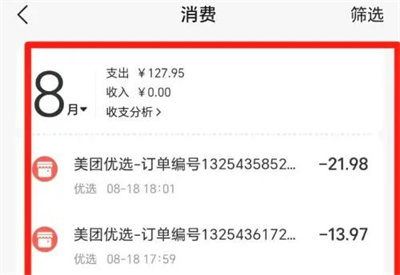
3. Next, enter the consumption page, where you can view your expenditure, income and other records in Meituan Select. You can also click "Filter" on the upper right to view.
The above is the detailed content of How to check consumption bills on Meituan Preferred. How to check consumption bills on Meituan Preferred.. For more information, please follow other related articles on the PHP Chinese website!
 How to solve the problem when the computer CPU temperature is too high
 linux view version information
 How to calculate the refund handling fee for Railway 12306
 The difference between random and pseudo-random
 gt540
gt540 What is the difference between legacy and uefi?
 How to download and save today's headline videos
 if what does it mean




















![[Web front-end] Node.js quick start](https://img.php.cn/upload/course/000/000/067/662b5d34ba7c0227.png)



