


As a popular Q&A platform, Zhihu’s user agreement is crucial to maintaining community order and protecting user rights. If you want to know how to view the Zhihu protocol, then don’t worry, PHP editor Apple has prepared a detailed tutorial for you. This article will guide you step by step to easily find and understand the content of the Zhihu Agreement, allowing you to feel more at ease when using the platform.
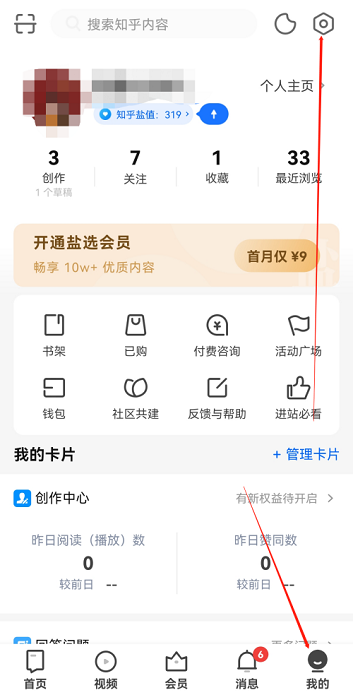
Step one: Open Zhihu, click on My, and click on the settings icon on the upper right.
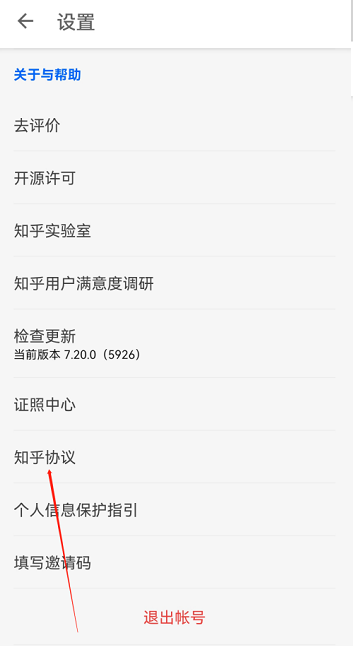
Step 2: After entering the settings page, scroll down to the bottom and click on Zhihu Agreement.
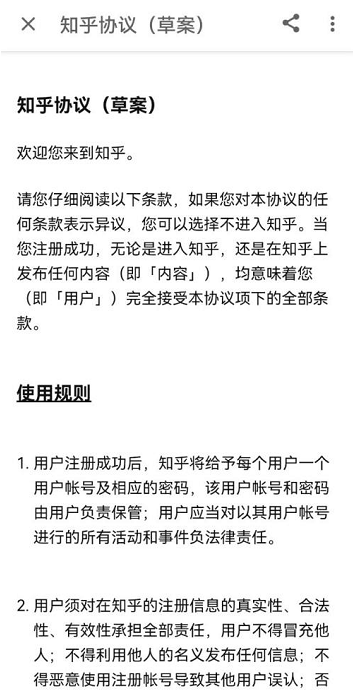
Step 3: After entering the Zhihu Agreement, you can see the content of the agreement, as shown in the figure below.
The above is the detailed content of How to view the Zhihu Agreement on Zhihu How to view the Zhihu Agreement on Zhihu. For more information, please follow other related articles on the PHP Chinese website!
 How to solve discuz database error
 The difference between gateway and router
 What does STO mean in blockchain?
 How to solve the problem of missing steam_api.dll
 How to remove the watermark of Douyin account from downloaded videos from Douyin
 html formatting method
 How much does it cost to replace an Apple mobile phone battery?
 Introduction to the meaning of javascript




















![[Web front-end] Node.js quick start](https://img.php.cn/upload/course/000/000/067/662b5d34ba7c0227.png)



