PHP development small forum tutorial reply-1
Our reply page also uses <table> table + css style for page layout
The final page effect is as shown below
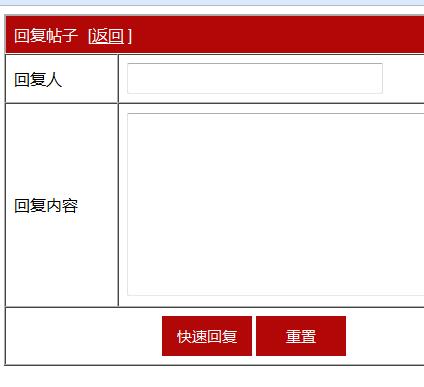
The code is as follows
<!DOCTYPE html>
<html lang="en">
        <head>
        <meta charset="UTF-8">
        <title>回复</title>
        <style>
.title{
    background-color: #B10707;
    color: white;
}
.sub{
    text-align: center;
}
.but{
    background-color: #B10707;
    width: 90px;
    height: 40px;
    font-size: 15px;
    color: white;
    border: none;
}
input{
    width: 250px;
    height: 25px;
}
.right{
    margin-left: 10px;
}
</style>
            <script type="text/javascript">
                function checkinput()
                {
                    if(myform.reply_author.value=="")
                    {
                        alert("请输入你的昵称");
                        myform.reply_author.focus();
                        return false;
                    }
                    if (myform.reply.value=="")
                    {
                        alert("请输入你想回复的内容");
                        myform.reply.focus();
                        return false;
                    }
                }
            </script>
</head>
<body>
<form method="post" action="reply_post.php?id=<?php echo $_GET['id']; ?>" onsubmit=" return checkinput();" name="myform">
        <table width="500px" border="1" cellpadding="8" cellspacing="0" align="center">
        <tr class="title">
        <td colspan="2">
        回复帖子<span class="right">[<a style="color: white" href="forums.php">返回</a> ]</span>
</td>
</tr>
<tr>
<td width="100px">回复人</td>
        <td><input type="text" name="reply_author"></td>
        </tr>
        <tr>
        <tr>
        <td width="100px">回复内容</td>
        <td><textarea cols="43" rows="10" name="reply">
        </textarea></td>
        </tr>
        <tr class="sub">
        <td colspan="2">
        <input type="submit" value="快速回复" class="but">
        <input type="reset" value="重置" class="but">
        </td>
        </tr>
        </table>
        </form>
        </body>
        </html>
The next step is to submit the content of our reply to the reply_post.php page for data processing

![Getting Started with PHP Practical Development: PHP Quick Creation [Small Business Forum]](https://img.php.cn/upload/course/000/000/035/5d27fb58823dc974.jpg)